Measuring Input Latency on Linux: X11 vs. Wayland, VRR, and DXVK
Two years ago, I switched to Linux on my gaming PC. People kept telling me that it could perform way better than Windows when it comes to FPS, frame pacing and input latency, and when I tried it out, it did feel a lot better.
The internet is full of advice on optimizing Linux for gaming:
- Wayland has bad input lag, use X11
- Disable compositing (“use flip mode”)
- Use a latency-optimized DXVK fork
- Use a gaming-specific kernel scheduler
- etc.
I play competitive FPS games, so low latency, consistent frame times and high FPS matter to me. On Linux, there are countless settings to tweak for this (magic env vars, gamescope, gamemode, even more DXVK forks, and so on).
But it always bothered me that I did not have a reliable way to verify whether something actually lowered the system latency or if it was just snake oil, a placebo effect, or actually worse without me realizing it.
The device
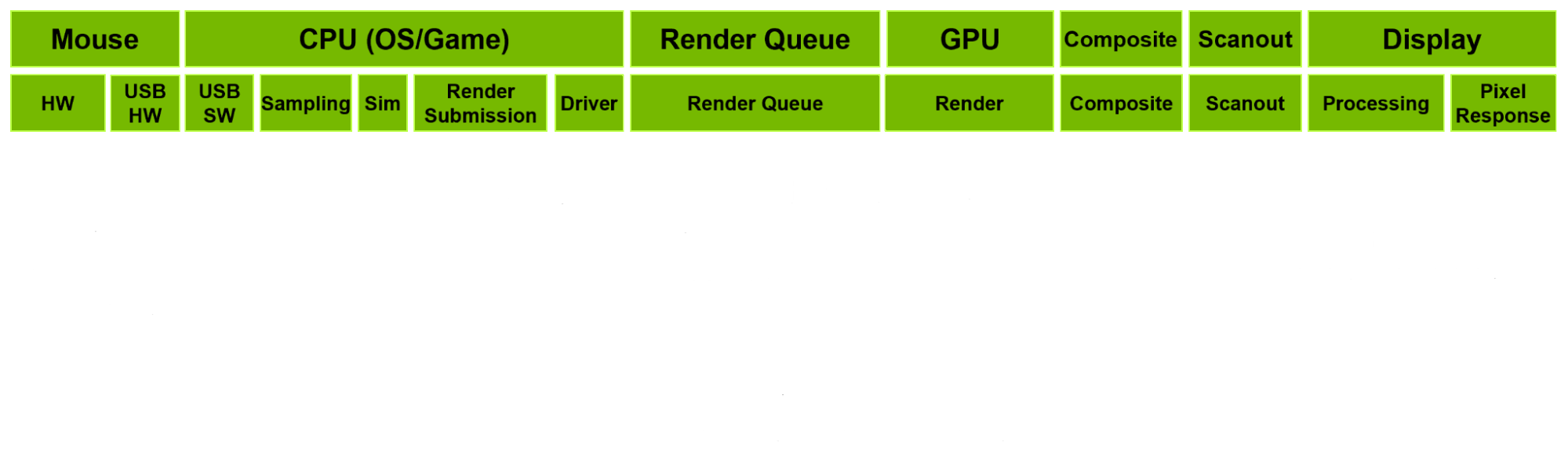
The idea is simple: Strap a device with some kind of light sensor onto a monitor and connect it via USB to the PC to simulate mouse clicks. On click, measure the time between the click and the moment the light sensor detects a change on the screen.
This way, you measure the end-to-end system latency.
While there are now a couple of open source devices like this available, like m2p-latency or the Open-Source-LDAT, when I started this side project, there was just the OSLTT, and knowing nothing about hardware, I was happy to study its schematics and loosely base my design on it.
But finishing my project just this month, I ended up integrating a lot of ideas from the other two projects as well.
To make a long story short, I learned a lot about microcontrollers, soldering, Arduino firmware development, integration time, transimpedance amplifiers, KiCad (just a little) and enclosure design.
Here’s what I landed on:
- An Adafruit QT Py RP2040 acts as a USB HID mouse with 1000 Hz polling rate and fires a click.
- The moment the click is sent, it starts collecting samples from the photodiode (every ~24 µs).
- 12,000 samples per click are streamed over serial to the host and logged to a CSV.
- Based on the samples, a tool on the host establishes a per-click baseline, then finds the first sample that deviates a certain amount from the baseline.
- Because the time it takes to collect 12k samples is fixed, it can now calculate the time between sending the click and detecting a brightness change on the screen.
Test scenarios
I wanted to test three different things.
Display server (X11 vs Native Wayland)
A lot of people still use X11 over Wayland because Wayland is said to have much worse input lag. Just searching for it, there are a lot of people complaining that Wayland “feels off”.
VRR (on vs off)
Variable Refresh Rate / G-Sync / FreeSync / Whatever you want to call it. Also highly debated.
DXVK low-latency fork (on vs off)
Referred to as dxvk-low-latency or low-latency from now on.
The maintainer of this fork, netborg, put a lot of effort into developing this frame pacer and it recently got integrated into the official proton-cachyos package, enabled via the env var PROTON_DXVK_LOWLATENCY=1. This fork’s promises were one of the deciding factors in me wanting to try out desktop Linux again.
Bonus: dxvk-low-latency vs default dxvk uncapped
The biggest advantages a frame pacer like dxvk-low-latency brings are to absorb frame time fluctuations and to prevent render-queue buildup.
With the testing method I used (a static in-game scene, see below for more), there were no frame time fluctuations to observe, as all tests produced purely CPU-bound scenarios. But this mostly does not reflect a real gaming session, where frame times can fluctuate because of what happens in-game or outside the game (e.g. other processes using resources).
So to show the pacer at work I added two uncapped test cases.
Bonus: Native Wayland vs XWayland
I ran all Wayland test cases via native Wayland (PROTON_ENABLE_WAYLAND=1) as I was already aware that XWayland would introduce lag. But for the sake of comparison, I added two XWayland test cases (only with VRR off).
Test conditions
| Hardware |
|---|
| AMD Ryzen 7 5800X3D |
| NVIDIA GeForce RTX 4070 SUPER |
| 2x8 GB DDR4 at 3200 MHz |
| MSI MAG 272QP QD-OLED X50 at 2560×1440 / 500 Hz |
| MSI B450 GAMING PRO CARBON AC |
Only one display was connected during the tests.
| Software | Version |
|---|---|
| CachyOS | - |
| Kernel | 7.1.3-2-cachyos |
| NVIDIA driver | 610.43.03-1 |
| KDE Plasma | 6.7.2-1.1 |
| xorg-server | 21.1.24-1.1 |
| proton-cachyos-native | 1:11.0.20260602-3 |
| dxvk (via proton-cachyos) | 3.0 |
The default CachyOS kernel scheduler was used.
System Settings
- 500 Hz refresh rate in system settings
- Flip mode on X11: Enabled via
nvidia-settings - Flip mode on Wayland: Confirmed to be enabled (see below how)
- VRR on X11: Enabled via
nvidia-settings(changing this requires a reboot) - VRR on Wayland: Enabled via KDE Settings Menu (no reboot needed)
Flip mode (or “direct scanout”) vs Blit mode (compositing) on Wayland: There is no setting for it. The compositor decides by itself whether it composites a frame or uses direct scanout.
To make sure the game is running in flip mode: Open “KWin Debug Console” (it’s a GUI tool) and in the “Effects” tab, enable showcompositing. Then make sure the game is fully focused and the only thing on screen in fullscreen mode. If there’s no red border visible around the edges of the game, it’s in Flip mode.
dxvk
To make the comparison fair, an optimized dxvk.conf was used depending on the scenario:
- If VRR was disabled,
dxgi.maxFrameRate = 500was set (FPS capped at the screen’s refresh rate) - If VRR was enabled and dxvk-low-latency was disabled,
dxgi.maxFrameRate = 497was set (FPS capped slightly below screen refresh rate) - If VRR was enabled and dxvk-low-latency was enabled, the following was used to utilize the low latency VRR frame pacing:
dxgi.maxFrameRate = 480
dxvk.lowLatencyOffset = 70
dxvk.framePace = "low-latency-vrr-500"
dxvk.lowLatencyAllowCpuFramesOverlap = False
In all cases, d3d11.cachedDynamicResources = "c" was set.
Game and Methodology
The game I used is Diabotical, a DirectX 11 game, launched through Heroic with Proton.
Game settings
- Native screen resolution
- 100% render scale
- Vsync off
- Every other video setting as low as possible
There is a hidden command that hides the UI for a short amount of time. Binding that command to left click (/bind mouse_left testlatency) and setting up a HUD that would display a large white box, I was able to produce large brightness differences on click.
Methodology
- Close unnecessary software.
- Launch the game.
- Start a local match server (same mode and map every time).
- Move to a specific spot, put the mouse onto a specific landmark.
- Run the test case iteration (100 clicks, runs for about 2 minutes).
- Once the test is done, start the next test case iteration (3 in total).
- In-game conditions: No bots, no other players, no movement, no round restarts. It is basically just a static scene that will stay like this indefinitely.
- System conditions: During testing, no other significant processes should be running on the system.
- The measuring device remained in the same position (see the video) across all tests.
Results
Every capped test case held its frame rate cap stable during testing and the game remained CPU-bound throughout.
The data seems clean: No test case produced wild outliers and every case produced a bell-shaped distribution, roughly 2 to 3 ms wide between p5 and p95.
Three things jump out:
- The 8 main cases all land within 0.72 ms of each other (medians from 4.21 ms to 4.93 ms).
- XWayland adds 3.13 ms on top of its native Wayland equivalent (8.06 ms vs 4.93 ms median).
- In the uncapped cases, the dxvk fork managed to reduce latency by 0.84 ms.
Here is the fastest case:
X11 vs Wayland
So, does X11 have lower latency than Wayland?
Yes, but nowhere near enough to explain why Wayland is generally perceived as much worse than X11.
| Configuration | X11 | Wayland | Difference |
|---|---|---|---|
| low-latency + VRR | 4.21 ms | 4.38 ms | +0.17 ms |
| low-latency | 4.64 ms | 4.83 ms | +0.19 ms |
| VRR | 4.45 ms | 4.67 ms | +0.22 ms |
| plain | 4.79 ms | 4.93 ms | +0.14 ms |
X11 wins in each scenario, but it is just a 0.14 to 0.22 ms difference.
The distribution is very similar:
---https://news.ycombinator.com/
VRR: on or off?
VRR has the biggest impact across the pairings: enabling it is 0.26 to 0.45 ms faster than leaving it disabled.
| Configuration | VRR off | VRR on | Difference |
|---|---|---|---|
| X11, low-latency | 4.64 ms | 4.21 ms | -0.43 ms |
| X11 | 4.79 ms | 4.45 ms | -0.34 ms |
| Wayland, low-latency | 4.83 ms | 4.38 ms | -0.45 ms |
| Wayland | 4.93 ms | 4.67 ms | -0.26 ms |
It also flattens the distribution: the p95-p5 spread is 2.1 to 2.2 ms in the VRR cases versus 2.6 to 3.0 ms without VRR.
That’s consistent with how VRR works: frames scan out when they are ready instead of waiting for the next scanout slot.
dxvk-low-latency is good
In the capped test cases, the difference is small but consistent and of about the same magnitude as X11 vs Wayland. Where the difference between Wayland and X11 is on average 0.18 ms, using dxvk-low-latency is on average 0.20 ms faster.
| Configuration | low-latency off | low-latency on | Difference |
|---|---|---|---|
| X11, VRR | 4.45 ms | 4.21 ms | -0.24 ms |
| X11 | 4.79 ms | 4.64 ms | -0.15 ms |
| Wayland, VRR | 4.67 ms | 4.38 ms | -0.29 ms |
| Wayland | 4.93 ms | 4.83 ms | -0.10 ms |
In the uncapped test cases, we can get an idea of where the real strength of dxvk-low-latency lies: smoothing out uneven frame pacing and preventing render-queue buildup.
The pacer does this by making sure the GPU is never fully utilized, so the game is always close to GPU-bound, but never entirely. This could be observed in the test runs, where GPU utilization was at 95-97% with dxvk-low-latency and at 100% without it. This comes at a small price in the form of FPS.
| Dimension | low-latency off | low-latency on | Difference |
|---|---|---|---|
| Latency | 5.27 ms | 4.43 ms | -0.84 ms |
| FPS | 715 | 670 | -45 |
XWayland is bad
All Wayland tests so far ran the game natively via PROTON_ENABLE_WAYLAND=1 (or the “Enable Wine-Wayland (Experimental)” toggle in Heroic Launcher). Turning that off makes the game run through XWayland instead, and that’s where it gets bad.
| Configuration | native Wayland | XWayland | Difference |
|---|---|---|---|
| low-latency | 4.83 ms | 5.95 ms | +1.12 ms |
| plain | 4.93 ms | 8.06 ms | +3.13 ms |
Without dxvk-low-latency, XWayland adds 3.13 ms of latency to the measurement. That is more than all the other effects I measured combined. It’s also not occasional bad frames dragging the average up; the entire distribution shifts:
Notably, adding dxvk-low-latency to the XWayland test lowered the latency by 2.11 ms, the biggest gain across all scenarios.
Summary
These results were produced under best-case conditions (stable FPS at cap, CPU-bound) and are of course specific to my hardware and chosen software stack.
The absolute numbers will look different on other setups, but the gains and losses from each test case should roughly transfer. On a lower refresh rate display, the gains from VRR and the low-latency pacer would likely be even larger.
Avoid XWayland
It added 3.13 ms of latency, more than all other effects combined.
Wayland is close, but X11 still wins
Though only by 0.14 to 0.22 ms. Given there are efforts to optimize KWin, this gap will likely close sooner rather than later. And who knows, other Wayland compositors might already be better.
VRR has the biggest effect
VRR was faster in every pairing (0.26 to 0.45 ms) and also flattened the latency distribution.
dxvk-low-latency is a win across the board
0.10 to 0.29 ms in capped scenarios is a nice boost, but the real strength of the fork shows in the uncapped test case, where it gained 0.84 ms over default dxvk.
Additionally, in scenarios where XWayland can’t be avoided, it recovered a full 2.1 ms.
Conclusion
Not factoring in XWayland, applying every optimization (X11, VRR, low-latency) compared to a default setup (which, on a modern Linux system, I assume is plain Wayland) moved the median down by 0.72 ms.
That does not sound like a lot, but the raw latency does not tell the whole story as VRR additionally reduces latency jitter, and dxvk-low-latency’s pacer is great at smoothing out real-world scenarios where frame time dips and GPU-bound situations occur.
Similar efforts
David Ramiro built his m2p-latency and compared X11 vs Wayland in his article Building an Input Latency Meter (Because ‘Wayland Feels Off’ Isn’t a Metric) as well, coming to similar conclusions:
Native Wayland is on par with native X11 (all tied at ~7 ms), while XWayland roughly doubled the latency in his tests.
farnoy did extensive testing with the Open-Source-LDAT in his post Linux latency measurements and compositor tuning, also concluding that XWayland should be avoided.
My side quest measuring input latency with VK_EXT_present_timing by Themaister describes a different method of measuring latency without any external hardware by injecting input via /dev/uinput and detecting the resulting image change on the GPU.
This does not measure end-to-end system latency, but removes USB and display latency from the equation, narrowing it down to only measuring PC latency. The project can be found on GitHub.