Shipping software is hard. My secret to doing it successfully is a combination of careful scoping, with strict avoidance of feature creep. But even then, it’s still insanely difficult to ship something.
Shipping multiple pieces of software one after the other in quick succession would be an even more gruelling task. Nobody in their right mind would choose to do such a thing…right?
Right?
I must have missed the memo because I’m shipping 20 apps and a screensaver…today!
- 14 × macOS apps (Mac App Store)
- 3 × macOS apps (TestFlight)
- 2 × iOS apps (App Store)
- 1 × macOS app (GitHub download)
- 1 × macOS screensaver (Web download)
Get them at gingerbeardman.com/apps/
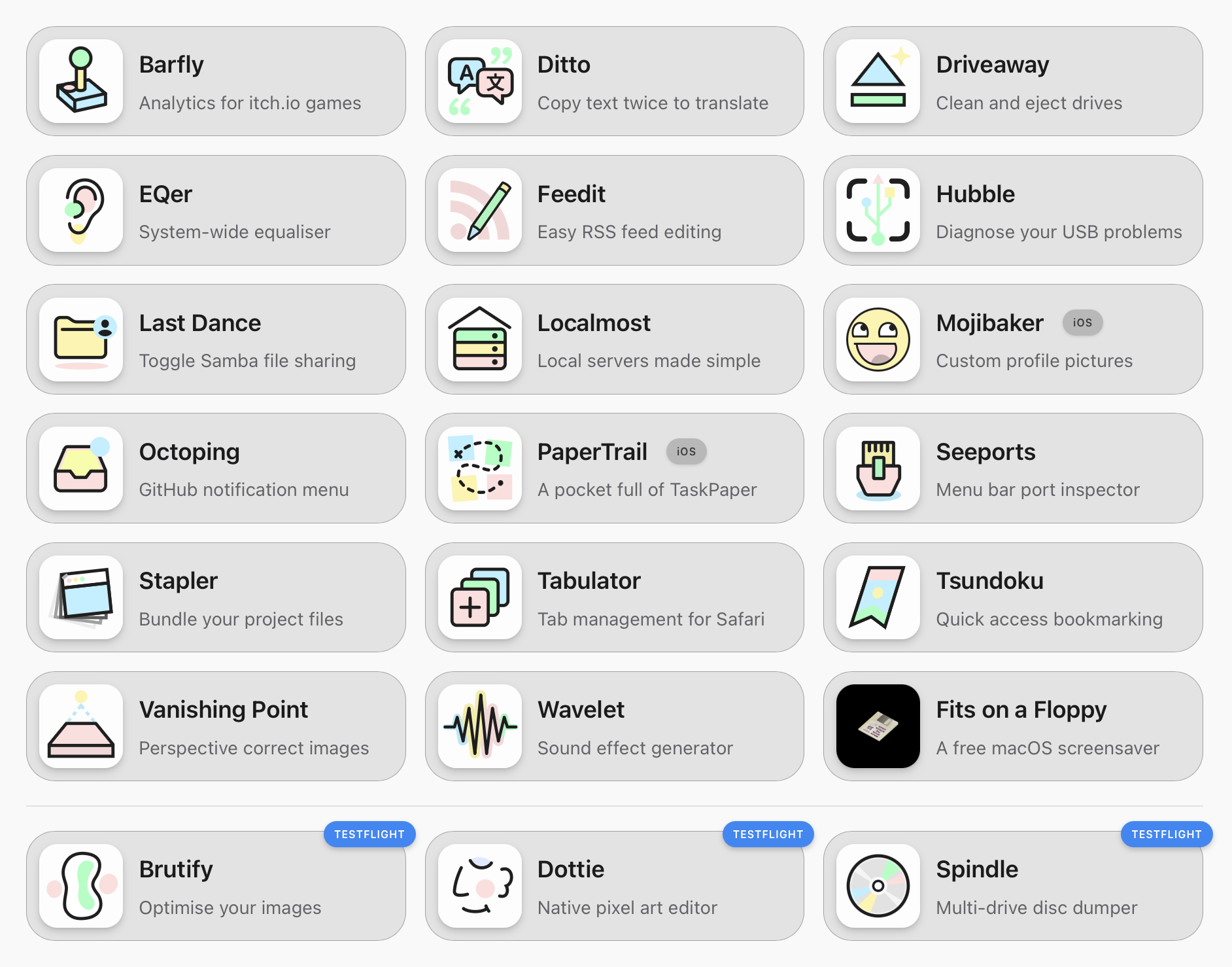
Twenty!?
Yup. So I think it’s a bit of a myth that software takes huge teams to make. Some of the most successful software of all time was created by individuals: MacPaint, HyperCard, Minecraft, RollerCoaster Tycoon, BitTorrent, Stardew Valley, WinAmp, Flappy Bird, Vim, the World Wide Web, HTML, URLs, and HTTP (those last four by the same person, Tim Berners-Lee). Or perhaps it was made by power duos: Photoshop, Doom, Quake, Google, WhatsApp, Figma, Sensible Soccer. It’s still quite common today, especially in the indie scene, but perhaps it’s not talked about as much?
I started making software in 1990 on the Atari ST, moved to Windows and the web in 1995, then to Macintosh in 2000, and iPhone in 2007. My apps and games have been featured in publications around the world, been downloaded millions of times, and one of my games—which happens to be only 39 KB—received a “best game of the year” accolade alongside Mario and Zelda. The only time I wasn’t actively making and releasing software was during my time working for Apple as a Technology Evangelist, because they don’t allow it.
So I had a bunch of apps that I’d built for myself over the years, and friends kept encouraging me to release them. Making an app for yourself is one thing, but shipping an app to the public is much more difficult. If I was to release one app every month it would take me almost two years to release them all! Doing the App Store Dance to that kind of beat is my idea of hell. So I decided to do it “once” for all my apps. It still took a couple of months to get them ready, and a further month to get them all approved. I do not advise anybody else do this, because it was painful. But I did it, and here we are!
WTH!?
To ship this many apps at once I had to optimise my workflow to an unprecedented level: Xcode projects set up as similarly as possible to reduce cognitive load, shell scripts to automate common build and test tasks, a script to generate changelogs ready for submission, another to automate incremental website builds based on changed files, and one more to generate screenshots of my screenshots, followed by asc to automate uploading data to App Store Connect.
Code hygiene got the same treatment. I ran Periphery across every project to find and remove dead/unused code, which shrinks the binary. Then jscpd to spot copy-paste duplication or similar code sections and refactor them into shared helpers, which can sometimes increases binary size slightly, but it’s a price worth paying for maintainability across so many codebases. There are several Xcode/compiler optimisations that can help strip unused data from the final binary, if you’re careful. I also “cheat” by adding only the largest icon size to macOS apps to avoid over 100 KB of additional icon size variations.
For the website I created a static site generator that uses a simple templating system to generate a static site for 20 apps, the whole thing is spat out in only 36ms. Each app has its own markdown content file with YAML front matter, markdown description for the press kit, privacy policy, RSS feed XML (managed by my app Feedit), maybe some FAQs, an SVG icon, and a bunch of screenshots in both light and dark mode. The press kit is zipped up on a full build and the static site is uploaded to my server over WebDAV. I even managed to hide a fun little mini game in there! The time and effort spent on this system over the last couple of months was roughly equivalent to building another app. But it was worth it.
Most of my apps cost a small amount up front. That’s a way to show your appreciation for the time I spent making them. It also means I never need to use ads, tracking, or subscriptions to make it worth me doing this. After all making software is my job, not a hobby. All apps are actively maintained—if an app hasn’t been updated in a while, it means it has reached a stable state, rather than it being abandoned. Supporting older versions of macOS comes for free when you’re not tied to dependencies that have their own requirements and release schedule.
Pricing is kept dead simple: $5, $10, or $15. Three tiers, no tricks, no “Pro” upsells, no subscriptions. Small utilities are $5, mid-size apps are $10, and the most capable or niche apps are $15. A couple are free, and there are some bundles to save money.
Fits On A Floppy
Many of these apps are small enough to fit on a 1.44 MB floppy disk. Not as a gimmick but as a discipline. I use only native frameworks, avoid dependency bloat, and keep features focused. Writing small software is harder than writing big software because every line of code has to earn its place. But the result is apps that download in a blink, launch instantly, and respect your system resources. I don’t miss floppy disks, but I miss the mindset they demanded: that every byte matters, that constraints breed creativity, and that software should be light on its footprint.
Read the full manifesto at fitsonafloppy.com and spread the word! ✨💾✨
The App List
These apps were all built to fill personal needs, but friends have encouraged me to release them for others to use. This is the bit where I was set to claim oldest app was about 8 years old, while the newest apps was about 8 days old. But sadly App Store Review got in the way, by rejecting my oldest app that I’ve had installed on my own phone since 2019 for being “too derivative” (I’ll revisit that and launch it another time), and they took longer to review the newest app than it did for me to develop it. Other fun rejections along the way: inappropriate use of the word “Safari” in an app for managing Safari browser tabs and bookmarks, and use of web server entitlements in a web server app. But you get the idea: these apps have taken a while to arrive.
Anyway, here they are, have fun with them:
Barfly macOS
Analytics for your itch.io games, right in the menu bar. Track views, downloads, and purchases with delta tracking across configurable time periods from one hour to one week. Refresh on a schedule and keep historic data.
Brutify macOS TestFlight
Lossless image optimisation using 14 engines running in parallel. Drop in images or folders and get perfectly optimised JPEG, PNG, GIF, and WebP assets without any quality loss. Fast, Slow, or Lossy modes to suit any workflow. A modern ImageOptim.
Ditto macOS
Translate text without switching apps. Copy text twice with CMD+C and your clipboard is translated using Apple Translate or DeepL. Includes a floating window for real-time translation as you type. A DeepL alternative.
Dottie macOS TestFlight
A native Mac pixel art editor built from scratch. Drawing tools, layers with onion skinning, frame-based animation, custom palettes with Lospec import, and export to PNG, GIF, SVG, and sprite sheets. A native macOS alternative to Aseprite, Piskel, Pixen, etc.
Driveaway macOS
Removes macOS metadata junk from external drives before you eject them. No more .DS_Store files, Spotlight indexes, and AppleDouble resource forks cluttering up your USB drives and SD cards.
EQer macOS
A system-wide 10-band equaliser that processes every app on your Mac in real time. Pick a preset, drag the curve, or paste your Audiogram and let it calculate the right listening curve for your hearing. Includes per-app control and dynamic range compression.
Feedit macOS
An editor for creating, managing, and publishing RSS 2.0 feeds. Import existing feeds, edit every field, validate against the spec, and publish to a local folder or WebDAV server. Drafts, iCloud sync, and Find & Replace built in. An alternative to Feeder.
Hubble macOS
Interactive USB topology viewer for macOS. See your complete device tree as a zoomable canvas with speed-coded cables, throttle warnings, power diagnostics, and hot-plug animations—all updating in real time.
Last Dance macOS download
Solves a persistent macOS bug where SMB file sharing becomes unresponsive after restart. It automatically disables file sharing before shutdown and re-enables it at login. No worries.
Localmost macOS
Spin up a local HTTP server by dragging a folder onto your menu bar. Multiple servers, automatic port assignment, access logs, and directory listings—all managed from a clean native interface.
Mojibaker iOS free
Create profile pictures with your choice of colours, gradients, images, then overlay emoji, genomji, memoji or stickers. Type a mood to get colour suggestions, compose your design, save presets, and export at high resolution.
Octoping macOS
GitHub notifications in your Mac menu bar. See what needs attention, grouped by repository with colour-coded icons matching github.com. Mark items as read or open them in your browser.
PaperTrail iOS
Full TaskPaper editing on iOS. Projects, tasks, notes, and tags with a powerful search query language, collapsible projects, widgets, and more. Syncs via iCloud and works with TaskPaper on Mac.
Seeports macOS
Shows every TCP port listening on your Mac from the menu bar. Ports are automatically grouped by service—Docker, OrbStack, Kubernetes, and more. Copy a localhost URL, open in browser, search for info on unknown ports, or terminate a rogue process.
Spindle macOS TestFlight
Raw device access for byte-accurate CD and DVD extraction, with support for hybrid ISO 9660/HFS discs and triple hashing for verification. Rip from multiple drives simultaneously.
Stapler macOS free
Bundle related files into logical projects without moving anything. Opening a single .stapled document opens your artwork, code, todo list, and your reference docs—all at once.
Tabulator macOS
A bird’s-eye view of every Safari tab across local windows, tab groups, cloud tabs, and bookmarks. Search, sort, tag, export, and manage tabs from one place. Includes a vertical tabs mode, Safari extension to show open tab count, and automatic daily backup with easy restore.
Tsundoku macOS
Quick access bookmarking for self-hosted services. A global hotkey captures the URL and title from your browser, suggests tags, and posts to Linkding, Raindrop, Shaarli, LinkAce, Karakeep, or Wallabag.
Vanishing Point macOS
Perspective correction for photos and images. Four correction tools with Apple Vision auto-detection, 256+ aspect ratio presets, background removal via Vision framework, colour sampling, plus image adjustments. Export as PNG, JPG, or TIFF. QuickLook and Finder Thumbnails are supported.
Wavelet macOS
Sound effect generator powered by synthesis, based on classic sfxr. One-click presets for laser zaps, coin pickups, explosions, and more. Layer multiple sounds with the built-in mixer and export as WAV, or as code in Lua, or Swift.
“Fits on a Floppy” Screensaver macOS download free
And finally, technically, the 21st release: a macOS screen saver inspired by After Dark and its classic Flying Toasters. It features flying disks that do barrel rolls and spins as they drift across your screen. Thanks to my friend Jason Morley for the idea, which I built while waiting for App Store Review to finish processing the rest. To make this easier, I upgraded the old test harness I built for my Today screensaver back in 2009.