GitHub Stacks in Jujutsu
GitHub released it’s stacked pull request (PR) feature into public preview on 2026-07-30. It mainly targets git users but has documented support for other, git-compatible version control systems like Jujutsu (jj).
This is a primer for using GitHub stacks with jj.
Prerequisites
Install CLIs
-
You need the
git(instructions) andjj(instructions) CLIs installed. -
You need the
ghGitHub CLI installed (instructions). -
Install the stacking extension with
gh extension install github/gh-stack
This article was written/tested against:
- jj v0.43.0
- git v2.52.0
- gh v2.96.0
- github/gh-stack v0.1.0
Configure jj
I will be re-using some jj aliases and revset aliases we defined in the previous article, Stacks in Jujutsu.
Bonus: Learn jj’s bookmark aliases
GitHub’s Stacked PRs require every PR to have a
jj bookmark (git branch), so you’ll be creating a
lot of these. UI tools in the future will surely automate
creating branch names under the covers, but for now, learn the
jj aliases for easily managing bookmarks:
| Command | Description |
|---|---|
jj b l |
list bookmarks |
jj b s <name> -r <commit>
|
Create (or move) a bookmark to the given commit |
jj b a |
Advance the nearest bookmark to the current commit
(like jj tug)
|
jj b --help |
Docs with the aliases for all the commands |
💡 Aside: Did you know that you can improve the default
jj bookmark advance (jj b a)
behavior by customizing the revset it uses? If you’re on a
new, empty commit ABOVE a commit with code, you probably
want to advance the bookmark to the code commit below you.
You can accomplish this with:
[revset-aliases."closest_pushable(to)"]
definition = 'heads(::to & mutable() & ~empty() & description(regex:".+"))'
doc = "Closest mutable, non-empty, described commits at or behind to"
[revsets]
bookmark-advance-to = "closest_pushable(@)"
jj makes it super easy to customize behavior by overriding
the built-in bookmark-advance-to revset to
whatever you want.
Manual Workflows
The gh stack CLI has a bunch of subcommands, most
of which manage or consume local tracking of the stack (e.g.
init, view). In a jj repo you will
only use the few subcommands that manage the remote stack on
GitHub (e.g. link, push), as follows:
Create a stack
-
Create a bookmark for each commit in your stack:
# go to the bottom of your stack using our revset alias
jj edit -r "stack_bottom()"
# give commit a name
jj b c <name>
# go to the next commit
jj next --edit
# give commit a name
jj b c <name>
# ... repeat for each commit in stack
-
Upload your bookmarks to GitHub, create draft PRs for each, and link them all into a stack:
Using our stack alias:
gh stack link $(jj sb -r "stack()")
Or, using a jj revision range:
gh stack link $(jj sb -r commit1::commitN)
Or, since
jj sbdefaults to your substack, you can go to the top (where your stack and substack are the same thing) and then link the entire stack:jj top --edit
gh stack link $(jj sb)
This last one is probably the easiest to remember.
Add a new commit to the TOP of the stack
Assuming the new commit is change id abc:
- Make sure you’re editing your new commit:
- Create a bookmark for the new, current commit:
-
If you’ve modified any of the downstack commits, you need to
push the updates (since
jj git pushwill do a--force-with-leasepush, butgh stack linkwon’t): - Re-run link with all stack bookmarks: The existing PRs (for everything downstack) will be skipped and the new branch will get a new draft PR and will be linked into the stack.
Add a new commit to the BOTTOM or MIDDLE of the stack
You can’t add to the middle of a stack (you’ll get an error:
“Cannot update stack: new PRs must be added to the top of the
existing stack”), so you have to delete your stack and
recreate it. Assuming the new commit is change id
abc:
-
Go to the GitHub web UI and remove the stack:
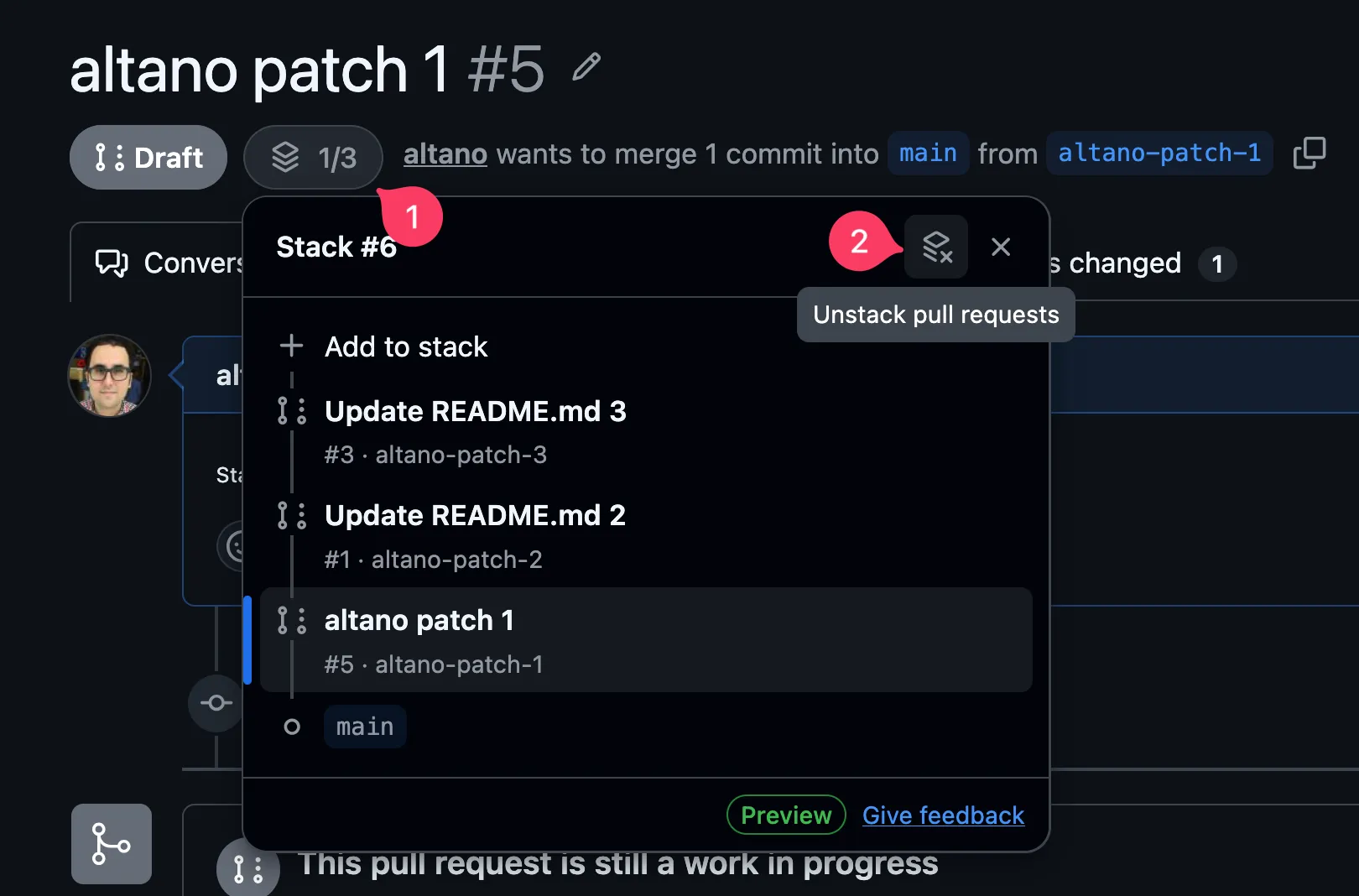
- Create a bookmark for the new commit:
- Since you’ve modified the rebased, upstack commits, re-push everything:
-
Re-run link with all stack bookmarks, including the new one:
the existing PRs will be skipped, and the new branch will get a new draft PR and will be linked into the stack
jj top --edit
gh stack link $(jj sb)
Remove a commit from the stack
You have to delete your stack and recreate it. Assuming the
commit to remove is change id abc:
-
Go to the GitHub web UI and remove the stack:
- Make sure you’re at the top of the stack:
- Abandon the commit if you haven’t already:
- Push your updates:
-
Re-run link with all stack bookmarks:
the existing PRs will be skipped and the stack will be recreated
jj top --edit
gh stack link $(jj sb)
-
Your removed commit will have an orphaned PR on GitHub.
Manually close it and/or delete the remote branch if you
want. Or, push all deleted bookmarks with
jj git push --deleted.
NOTE: Deleting the remote branch closes its PR, so if you run
the jj git push --deleted
before re-running gh stack link ..., you
will end up closing the PR ABOVE the removed branch as well.
Delete after linking to avoid this.
Update the existing commits of an existing stack
- Re-push your stack:
Merge your stack
Like unstacking, it is theoretically possible to do it from the CLI, but too complicated:
gh stack link --open $(jj sb -r "stack()") # draft => published
gh stack merge $(gh pr view "$(jj sb -r "stack()" | awk '{print $NF}')" --json number --jq .number) --yes --squash
So, just do this from the web UI. You’ll probably be there anyway, checking on that CI signal. 🤷🏽♀️
Updates
There are almost certainly ways to improve the above workflows that I’m totally missing. If you have one hit me up and I’ll update this article.
Impressions and closing
The future improvements I’m hoping for:
- GUI tools that build upon the manual steps above, automating away the tedium. I personally use the amazing VisualJJ vscode extension to do 80% of my jj commands and I assume the devs are working on adding GitHub stack support.
-
gh stackextension getting a singlegh stack submitsubcommand that just figures stuff out, rendering everything above obsolete. - Improvements to the workflows that require deleting the stack and recreating it, e.g. adding a commit to the middle of the stack.
As it is today, this stuff generally works and I’m very excited to get stacking functionality in GitHub. My initial impression is that one can immediately put this feature to good use, and I’m grateful to the developers that worked on this feature.
That said, let’s acknowledge the elephant in the room: this is an unambitious implementation of stacked PRs. GitHub’s stacked PRs build entirely on the existing, flawed model of GitHub PRs without changing any of the foundations:
I apologize for being somewhat direct but what prior art did you engage with? Why are you making people create a branch for each change in a stack? Why do developers have to create new commits when iterating on the PR? Where is the proper support for interdiffs? What about change IDs? -sunshowers on Hacker News
Instead of automatic change ids we get manual branches. Instead
of an automatic gh stack submit (like
graphite’s
or
git-branchless’
submit commands), you’re left feeding gh stack the
list of branches by hand. Etc.
In short, go in with low expectations of the developer experience and you’ll be happy with the end result: a working PR stack in GitHub.
Production Notes
AI Facts
1 serving per container
Serving sizeAbout 1 article
Amount per serving
Machine-Written Words 0%
% Machine*
- Prose Written by hand. Proof-read by machine. Edits applied by hand. 0%
- Code & Config 0%
- Creation All code/configuration written by hand. 0%
- Validation All code/configuration programmatically verified by Claude Opus 5 for correctness and consistency. Fixes applied by hand. 100%
- Human Review 100%
* % Machine tells you how much of this article a machine wrote. Values are yolo'd, not a measurement. This label has not been evaluated by the Food and Drug Administration.