I needed a keyboard that could do four things at once: US-standard shortcuts for coding, Vim-style cursor movement, a Hyper key for launchers and scripts, and Italian accented vowels without switching input sources. A standard US keyboard doesn't have enough keys for all of that. Something always has to share a binding with something else.
So I switched to a JIS keyboard on purpose.
Get it on GitHubGet it on GitHub
Why JIS
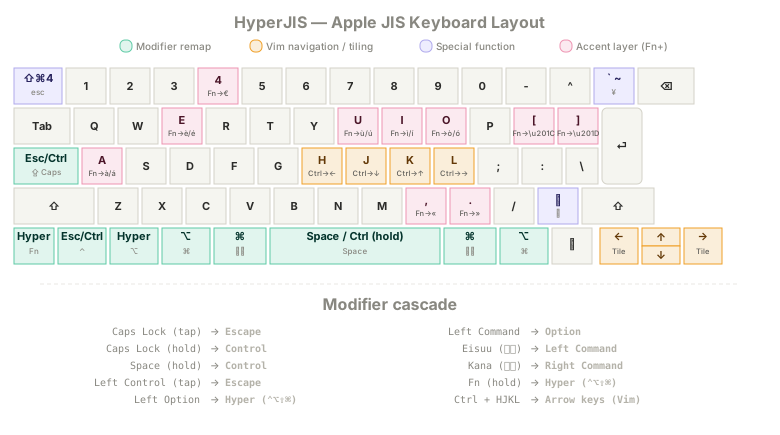
Apple's Japanese keyboard has more keys than its US equivalent. Two extra keys sit on either side of the spacebar (Eisuu and Kana). There's an extra key above Return (¥) and another near right Shift. On a stock JIS setup, these keys handle Japanese input methods that I don't use. On my setup, they're the foundation of the whole layout.
Eisuu and Kana become Command, right under both thumbs. The ¥ key becomes backtick (essential for coding). The extra key near Shift opens the emoji picker. Every "wasted" JIS key gets a job, and I still have room for a Hyper key and an accent layer on top.
The other reason I picked JIS: Apple makes this keyboard for every product line. Magic Keyboard, MacBook Pro, Air. I can order one anywhere. I use the same physical board at home and at work, with blank black stickers over every keycap. No legends, no peeking. The layout lives in my hands, not on the keys. Install Karabiner on a new Mac, import one JSON file, and my full setup is ready in two minutes.
I've been running this config for years. It's called HyperJIS.
What it actually does
The core idea is a modifier cascade. Each key does double duty:
Caps Lock           →  Fn
Space (hold)        →  Control
Left Control (tap)  →  Escape
Left Control (hold) →  Control
Left Option         →  Hyper (⌃⌥⇧⌘)
Left Command        →  Option
Eisuu (英数)         →  Command
Kana (かな)          →  Command
If you read that list, Command ends up under your thumbs. Control sits under your right thumb when you hold Space. Escape is a quick tap on Left Control. Hyper (all four modifiers at once) lives where Option used to be, ready for Raycast or Keyboard Maestro bindings. I also recommend setting macOS to map Caps Lock → Control (System Settings → Keyboard → Modifier Keys), which gives you Caps Lock as a second Escape/Control key.
Then there's Vim navigation. Hold Ctrl (which is Space, remember) and press H, J, K, L for arrow keys. I do this hundreds of times a day. Selecting text, jumping between fields, navigating code. My fingers never leave the home row.
With arrows handled by HJKL, the physical arrow keys are free. I use Swish to map them to window tiling: halves, quarters, fullscreen. If you don't use Swish, disable that one rule and your arrows work normally.
Accents without input-source switching
I type in Italian regularly, and accented vowels (è, à, ù, and friends) show up constantly. Switching macOS input sources every time I need one breaks my flow: the menu bar changes, shortcuts shift, and I have to think about which layout I'm in instead of what I'm writing.
HyperJIS uses the physical Fn key as an accent trigger. Hold Fn, tap a vowel, and you get the grave accent: è, à, ì, ò, ù. Tap the same combo again quickly and it swaps to acute: é, á, í, ó, ú. Grave-first makes sense for Italian, where grave accents are far more common. The swap is there for the few words that need acute (perché, sé).
I also mapped Fn+4 to €, Fn+comma and Fn+period to « and », and Fn+brackets to smart quotes. Small things, but they add up when you're writing in a Romance language on a US-style keyboard.
Modular language support
The accent system started as an Italian-only setup, but the architecture generalizes. Grave and acute accents cover every Romance language. French, Spanish, Portuguese, and Italian all use the same five vowels with the same two accent directions. So I split the accent layer into a base file and language-specific extensions:
Romance base covers grave and acute on all vowels, plus €, guillemets, and smart quotes. This handles Italian completely and gives Spanish and Portuguese their accented vowels.
French extension adds circumflex (â, ê, î, ô, û) via Fn+Option+vowel, plus ç via Fn+c and œ via Fn+q. Enable this alongside the base file for full French coverage.
Spanish extension adds ñ via Fn+n, ¡ via Fn+1, and ¿ via Fn+/. Three characters, one small file.
German extension adds umlauts (ä, ö, ü) via Fn+Option+vowel and ß via Fn+s. This works standalone or stacked with the Romance base.
You pick the files that match your languages. A Spanish speaker installs two files. A French speaker installs two files. Someone who only needs German installs one. The core layout and the accent files are independent of each other: you can use the accents without adopting the full HyperJIS modifier cascade.
How to install
- Install Karabiner-Elements
- Click to import the files you want:
- Open Karabiner, go to Complex Modifications, click Add Rule, enable what you want
- Optional: install Swish for window tiling with the arrow keys
Each rule can be turned on or off individually. Try the full set, then pare back if something doesn't fit how you work.
Who this is for
People who use Apple JIS keyboards, code, and type in more than one language. It's opinionated: you lose Caps Lock (it becomes Fn), you lose the physical Escape key (it becomes screenshot), and you need to learn the modifier cascade. If those tradeoffs don't work for you, individual rules still work standalone. The Vim navigation and Space-as-Control rules are useful on any keyboard, JIS or not.
HyperJIS is free and open source, licensed under GPL-3.0.