I use excalidraw to manage my diagrams for my blog
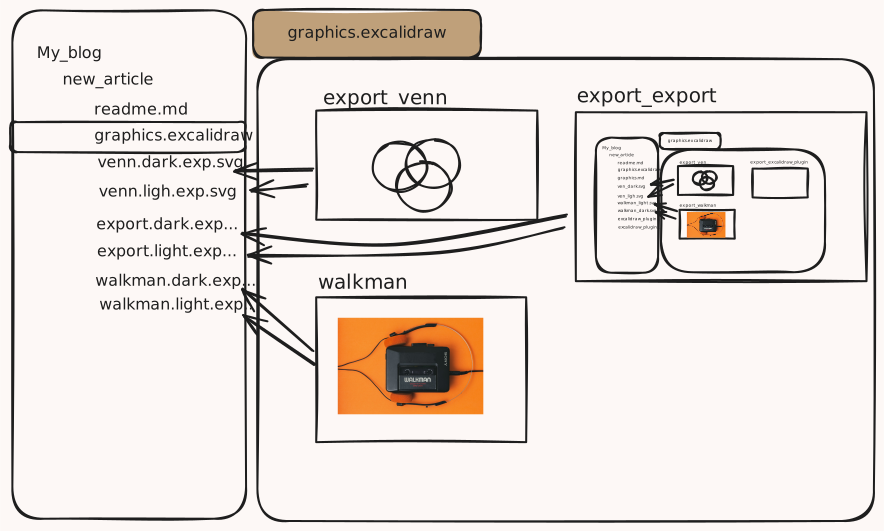
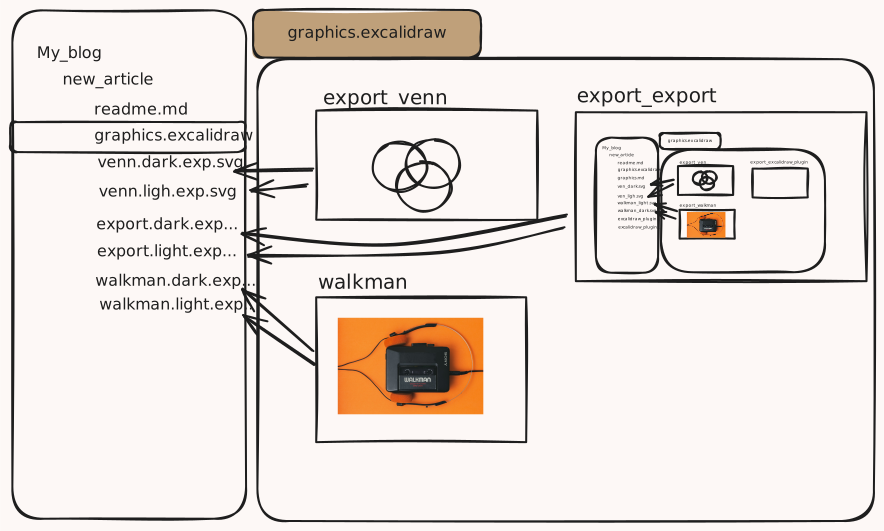
TL;DR I use an Excalidraw, wrap the elements of interest with a frame, name it with export_ prefix, my forked excalidraw extension automatically generates SVGs for light and dark mode.
Using Excalidraw
I used Excalidraw a lot in the past.
- When breaking down a technical problem for myself
- When explaining a concept or an architecture to my coworkers.
Just recently a new usecase evolved.
- Expressing my thoughts in my Blog.
While writing my first article the dependency between graphics and the text lead to a lot frustration. Fine-tuning the graphic led to an easier text. Changes in the text made me realize that some information in the graphic is not needed to grasp what should land.
The Problem
Every change in a graphic in Excalidraw meant 9 clicks in Excalidraw.
- Selecting the frame
- pressing export
- choose the right name + darkmode/lightmode postfix
- export
- switch light/dark mode
- choose the right name + darkmode/lightmode postfix
- export again
- realize that one label crossed the frame boundary
- starting at 1 again.
It took me about 45 seconds.
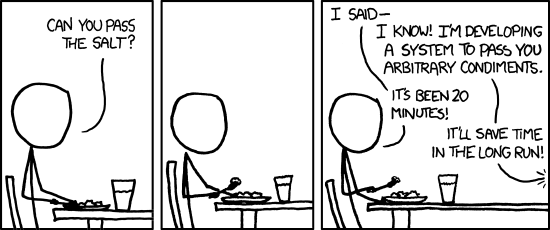
Automate it :-) .
First approach - the GitHub action
...20 minutes later... A bit of bash thanks to open source (specifically JonRC's excalirender) - it worked...
A little GitHub action that:
- looks for changed excalidraw files in the last push,
- uses jq to find frames inside of those,
- exports them in dark and light mode as [framename]-[light/dark],
- commits those new svg files to the repo again.
See code here:
name: Export Excalidraw Frames

on:
  push:
    branches:
      - main
  pull_request:
    branches:
      - main

permissions:
  contents: write

jobs:
  export-frames:
    runs-on: ubuntu-latest

    steps:
      - name: Checkout repository
        uses: actions/checkout@v4
        with:
          fetch-depth: 2  # Fetch last 2 commits to compare with HEAD~1

      - name: Get changed Excalidraw files
        id: changed-files
        run: |
          # Get list of changed .excalidraw files since last commit
          if [[ "${{ github.event_name }}" == "push" ]]; then
            CHANGED_FILES=$(git diff --name-only HEAD~1 HEAD | grep '\.excalidraw$' || true)
          else
            # For PRs, compare with target branch
            CHANGED_FILES=$(git diff --name-only origin/${{ github.base_ref }} HEAD | grep '\.excalidraw$' || true)
          fi

          if [ -z "$CHANGED_FILES" ]; then
            echo "No changed .excalidraw files found"
            echo "has_changes=false" >> $GITHUB_OUTPUT
          else
            echo "Changed files:"
            echo "$CHANGED_FILES"
            echo "$CHANGED_FILES" > /tmp/changed_files.txt
            echo "has_changes=true" >> $GITHUB_OUTPUT
          fi

      - name: Install excalirender
        if: steps.changed-files.outputs.has_changes == 'true'
        run: |
          curl -fsSL https://raw.githubusercontent.com/JonRC/excalirender/main/install.sh | sh
          echo "$HOME/.local/bin" >> $GITHUB_PATH
          excalirender --version || echo "excalirender installed"

      - name: Export frames for changed files
        if: steps.changed-files.outputs.has_changes == 'true'
        run: |
          # Create export script
          cat > /tmp/export_frames.sh << 'EOF'
          #!/bin/bash

          EXCALIDRAW_FILE="$1"
          OUTPUT_DIR="$(dirname "$EXCALIDRAW_FILE")"

          # Read the Excalidraw file and extract frame names
          FRAME_NAMES=$(jq -r '.elements[] | select(.type == "frame") | .name // "frame-" + .id' "$EXCALIDRAW_FILE")

          if [ -z "$FRAME_NAMES" ]; then
            echo "No frames found in $EXCALIDRAW_FILE"
            exit 0
          fi

          echo "Exporting frames from $EXCALIDRAW_FILE"

          # Export each frame in light and dark mode
          while IFS= read -r frame_name; do
            if [ -n "$frame_name" ]; then
              echo "  Exporting frame: $frame_name"

              # Sanitize frame name for use in filename
              safe_name=$(echo "$frame_name" | sed 's/[<>:"/\\|?*]/-/g' | sed 's/\s+/-/g')

              # Export light mode
              excalirender "$EXCALIDRAW_FILE" --frame "$frame_name" -o "${OUTPUT_DIR}/${safe_name}-light.svg"

              # Export dark mode
              excalirender "$EXCALIDRAW_FILE" --frame "$frame_name" --dark -o "${OUTPUT_DIR}/${safe_name}-dark.svg"
            fi
          done <<< "$FRAME_NAMES"

          echo "  ✓ Exported all frames from $EXCALIDRAW_FILE"
          EOF

          chmod +x /tmp/export_frames.sh

          # Process each changed file
          while IFS= read -r file; do
            if [ -n "$file" ]; then
              echo "Processing: $file"
              /tmp/export_frames.sh "$file"
            fi
          done < /tmp/changed_files.txt

      - name: Commit exported SVGs
        if: steps.changed-files.outputs.has_changes == 'true'
        run: |
          git config --local user.email "github-actions[bot]@users.noreply.github.com"
          git config --local user.name "github-actions[bot]"

          # Add all newly created SVG files
          git add **/*.svg 2>/dev/null || git add *.svg 2>/dev/null || true

          # Check if there are any changes to commit
          if git diff --staged --quiet; then
            echo "No new SVG files to commit"
          else
            echo "Committing exported SVG files"
            git commit -m "chore: export Excalidraw frames as SVGs

            - Exported frames from changed .excalidraw files
            - Generated light and dark mode variants

            🤖 Generated with [Claude Code](https://claude.com/claude-code)

            Co-Authored-By: Claude <noreply@anthropic.com>"
            git push
          fi
Awesome! Enough to continued working on my article.
Problems with approach 1
After working with this approach for some time I faced various issues.
- The library I used had some rendering bugs (same as this one)
- The process involved spinning up an x86 based docker image I couldn't get running on my ARM-based Mac
I circumvented 1.) with additional labels added but 2.) broke the whole concept. Not being able to run the export locally meant I needed to push the Excalidraw file to GitHub, wait for the pipeline to finish, and pull the new commit before I could see new images or changes in images reflected.
So the solution kind of worked but reviewing the blog post locally was only possible with outdated images.
A new Idea: Add auto-export to Excalidraw
What if Excalidraw's VSCode extension would check the open *.excalidraw file for changes and automatically export each frame as two separate SVG files - one in dark mode, one in light mode?
I took some time with Claude over the weekend to YOLO code. The result:
If I edit my Excalidraw in VSCode, all I need to do to make a section available for my blog post:
- wrap the elements with a frame
- name the frame like
export_${image_name}
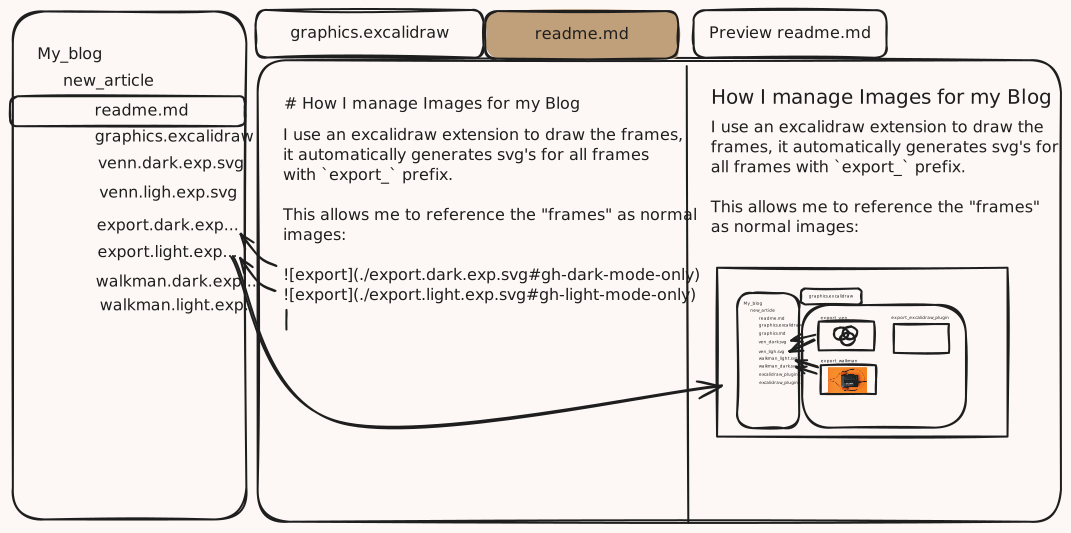
The extension will pick up the frame, export it as SVG in dark and light mode, and save two SVGs named ${image_name}.light.exp.svg and ${image_name}.dark.exp.svg next to the Excalidraw file.
Live preview locally
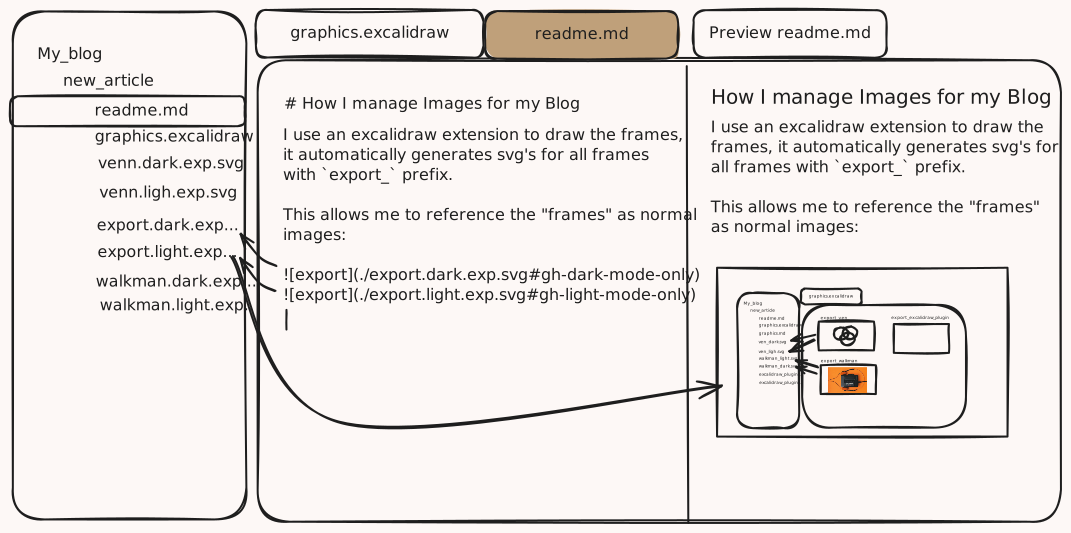
Now that those images are available locally and update whenever I change a frame in my Excalidraw, I can reference them via auto-complete and preview in the editor, see them rendered in the Preview tab.
Conclusion
I am pretty happy with the result. I spent only a couple of hours including this writeup. Using the tool brings joy since it solves a real pain.
I can't wait to use it extensively in the articles in the making - SQLite on Git.
One thing I'm not sure about, though. After talking to others about this approach I could see my approach bringing value to the original Excalidraw extension itself. But I wouldn't create a pull request - since I don't own the code - or rather, I don't want to take ownership. I'm thinking to open an issue, describe the problem and the solution to serve as inspiration instead.
If others find this useful and play around with it - I created artifacts for the release section in my GitHub fork that allows others to download and use my extension. For now, that's enough!