Ghostty 1.3.0 has been released
Ghostty 1.3.0 is a significant release which includes many of the most requested features such as scrollback search, native scrollbars, click-to-move-cursor in shell prompts, and more. It also includes hundreds of improvements, bug fixes, and performance optimizations across all platforms.
This release features 6 months of work with changes from 180 contributors over 2,858 commits. Thank you to all the contributors, maintainers, community moderators, translators, packagers, and users who each helped make this release possible.
These release notes are painstakingly and lovingly hand-crafted by human Ghostty maintainers, including the full changelog. They take a combined 16+ hours to write, so please enjoy. 🥰
- CVE-2026-26982.
Fixed an issue where control characters such as
0x03(Ctrl+C) in pasted or drag-and-dropped text could be used to execute arbitrary commands in some shell environments. This requires user interaction (copy-paste or drag-and-drop) to trigger.
PRs: #9585 #9602 #9687 #9702 #9709 #9756
You can now search your terminal scrollback with cmd+f on macOS or
ctrl+shift+f on GTK. Search highlights all matches in the viewport and allows
you to navigate between them with the arrow buttons or cmd+g / shift+cmd+g
(macOS) or enter / shift+enter (GTK). All of these keybinds are
configurable, of course.
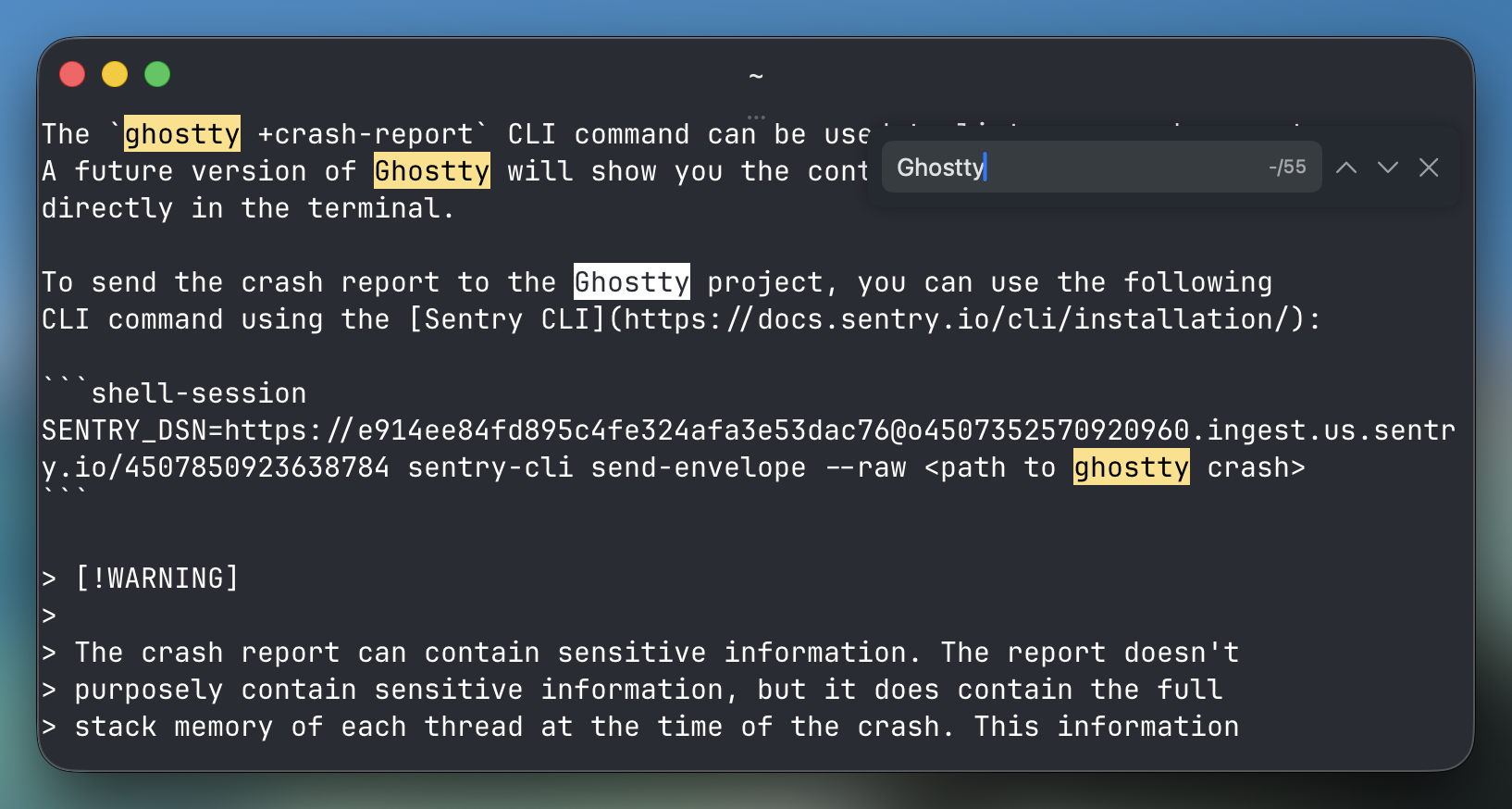
On macOS, the search bar can be dragged to any of the four corners of
the terminal if it gets in the way. The search also integrates with
standard macOS conventions: the menu bar, Find Next / Find Previous
shortcuts, and the system find pasteboard all work as expected.
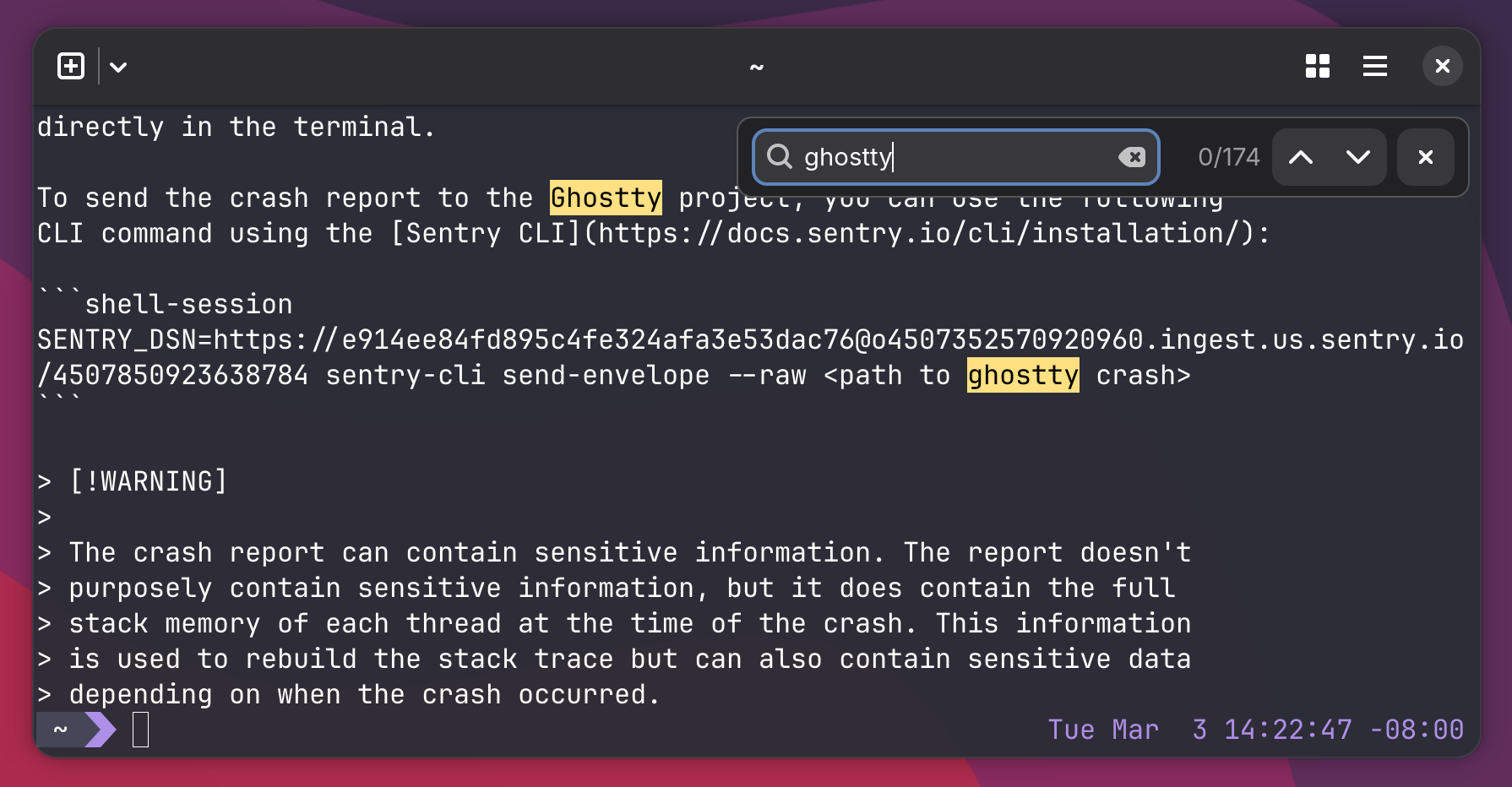
On GTK, the search bar also appears in one of the corners and can be dragged to any corner.
Search is implemented using a dedicated search thread that operates concurrently with terminal I/O. The thread grabs the terminal lock in small time slices to make forward progress on searching while minimizing impact on I/O throughput or rendering. If you do not use search, or you close the search bar, the search thread exits and does not consume any resources.
Ghostty now has native scrollbars. A new scrollbar configuration controls
whether scrollbars are visible, defaulting to system which lets the
OS decide.
The scrollbar on both macOS and GTK uses native widgets and styling, and supports all the standard interactions you would expect, such as dragging the knob, clicking the track, using scroll gestures, etc.
On both platforms, we use a minimal overlay-style scrollbar so that the terminal grid doesn't have to reserve space for the scrollbar with an aesthetically unpleasant gap or gutter. The scrollbar is overlaid on top of the terminal contents with minimal styling to prevent impacting selection.
PR: #10455
Ghostty now supports the click-events
and cl=line
extensions to the OSC 133 Semantic Prompts specification.
This lets you click your mouse within an active shell prompt to move
the cursor, like a normal text field.
This feature is supported natively by Fish (v4+) and Nushell (0.111+). For other shells, support varies based on Ghostty's injected shell integration. If you're using a supported shell, this will just magically work.
Additionally, Ghostty now has a much more complete and accurate implementation of OSC 133 which enables more accurate behaviors for our long-supported jump-to-prompt or copy command output features. This also results in better resize behaviors while at an active prompt.
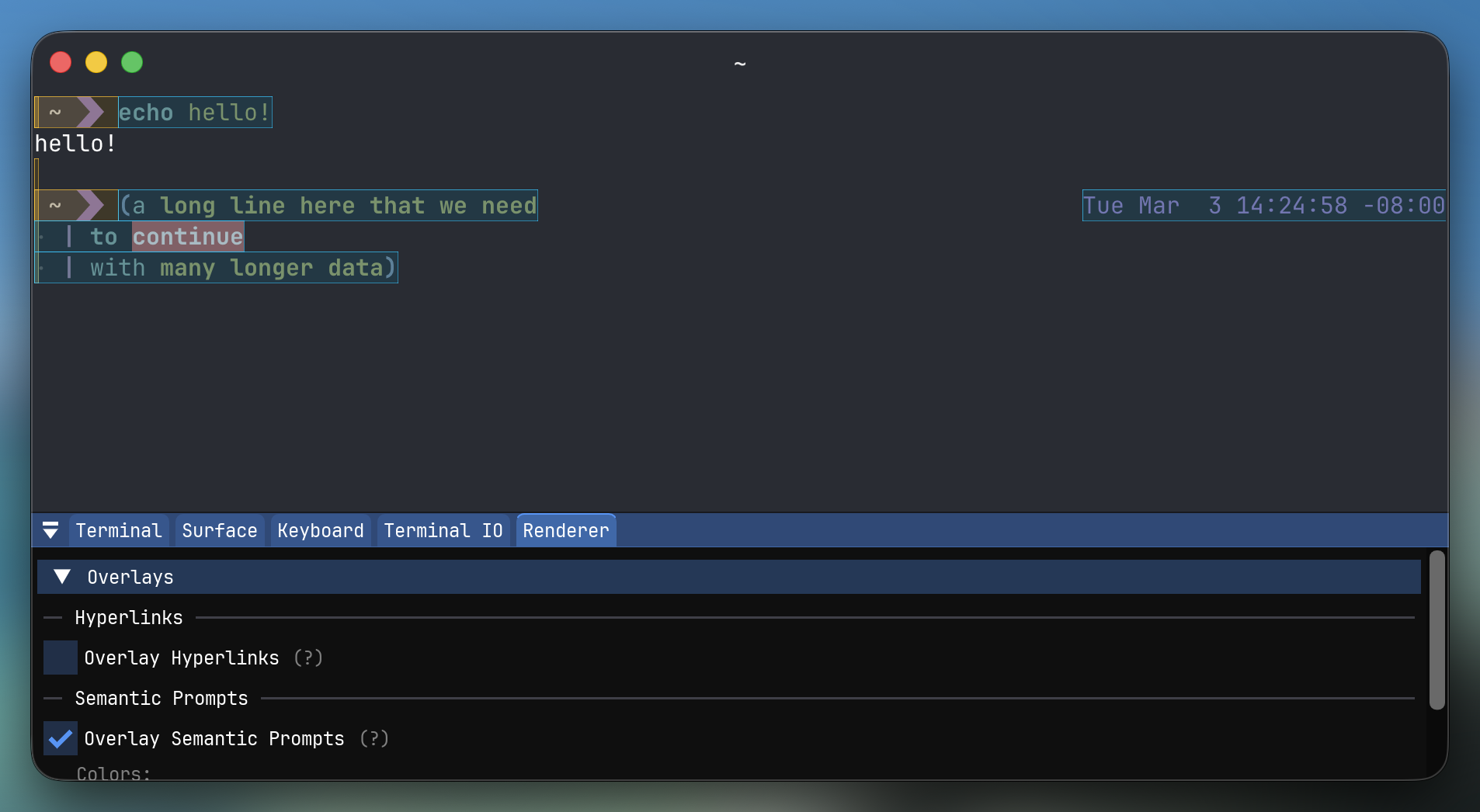
As a fun detail, we also added a really cool debug overlay that shows the OSC 133 areas, which were a significant help for shell developers working to better support this. This can be enabled by anyone in the terminal inspector.
Ghostty can now notify you when a long-running command finishes. This is useful when you kick off a build or test suite and switch to another window and want to be notified when it's done, for example.
Three new configuration options control this feature:
notify-on-command-finish = unfocused
notify-on-command-finish-action = no-bell,notify
notify-on-command-finish-after = 30s
notify-on-command-finish controls when notifications are sent: never
(default), unfocused (only when the terminal is not focused), or
always. notify-on-command-finish-action controls how you're notified,
supporting bell (default) and notify (desktop notification), which
can be combined or negated (e.g. no-bell,notify).
notify-on-command-finish-after sets the minimum command duration before
a notification is sent, defaulting to 5 seconds.
This feature uses OSC 133 escape sequences to track command execution, so it requires shell integration to be enabled or a shell that sends OSC 133 sequences natively such as Fish or Nushell.
Ghostty 1.3 adds many new features to our keybind system for keybind
power users: key tables, chained keybinds, and the catch_all special key.
Key tables enable tmux-like modal keybinding workflows. A key table is a named set of keybindings that can be activated or deactivated on demand. When a table is active, key presses are looked up within that table first, allowing you to create entirely separate keybinding modes.
Tables are defined using a <name>/<binding> syntax on the existing keybind
configuration. For example:
keybind = resize/arrow_up=resize_split:up,10
keybind = resize/arrow_down=resize_split:down,10
keybind = resize/arrow_left=resize_split:left,10
keybind = resize/arrow_right=resize_split:right,10
keybind = resize/escape=deactivate_key_table
keybind = resize/catch_all=ignore

keybind = ctrl+a=activate_key_table:resize
In this example, pressing ctrl+a activates the resize table. While active,
the arrow keys resize splits and all other keys are ignored. Pressing escape
deactivates the table and returns to normal keybinding behavior.
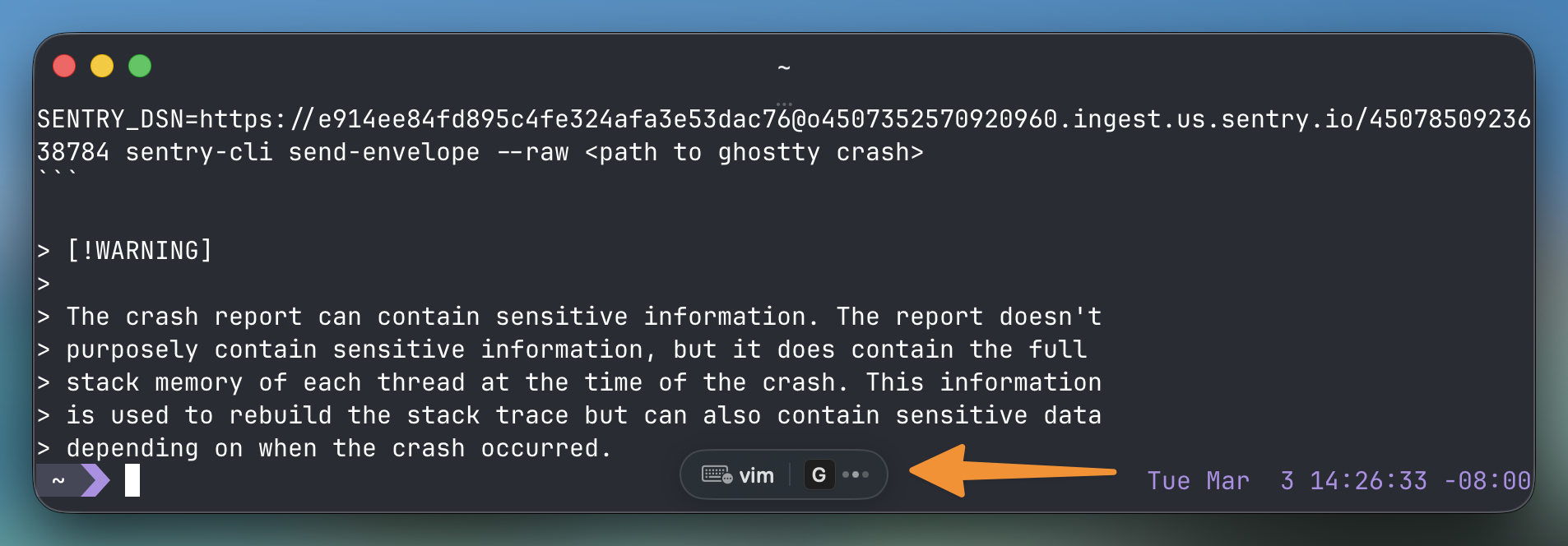
On both macOS and GTK, a dedicated UI indicator shows when a key table is active, similar to the existing key sequence indicator.
Chained keybinds let you bind multiple actions to a single key. Using
the chain key, actions are appended to the most recently defined binding:
keybind = ctrl+shift+f=toggle_fullscreen
keybind = chain=toggle_window_decorations
This triggers both actions when ctrl+shift+f is pressed. Chains work within
key tables and with key sequences.
catch_all is a new special key that matches any key not explicitly bound.
It can be combined with modifiers (ctrl+catch_all=ignore) and used within key
sequences (ctrl+a>catch_all=end_key_sequence), making it easy to build
self-contained modal keybinding sets that don't leak unintended input to the
terminal.
PR: #9158
New configurations tab-inherit-working-directory and
split-inherit-working-directory allow you to control working directory
inheritance independently for new tabs, windows, and split panes. This
was one of the most requested configuration features.
window-inherit-working-directory = false
tab-inherit-working-directory = true
split-inherit-working-directory = true
Longer term, we plan on supporting better conditional configuration in a more general way, but this specific use case was so highly requested that we added these specific options for now to get it in sooner.
Clipboard copy now sets multiple content types on the clipboard
(both text/plain and text/html) to enable rich text pasting with
formatting so when you paste into a rich text editor, you get formatted
text with colors and other styles preserved.
The copy_to_clipboard binding now supports a parameter specifying
the format to copy. In addition to mixed, plain, and HTML formats, the
binding also supports vt which copies text with terminal escape sequences
to preserve formatting when pasting into another terminal.
PRs: #8757 #10895 #9680 #10465 #9883 #10179 #10295 #10332
Text in Brahmic scripts such as Devanagari, Bengali, Tibetan, Javanese, Tai Tham, and Chakma now renders correctly. These scripts rely on font shaping to form ligatures, position combining marks, and join characters, and all of these are significantly improved.
An update to Unicode 17 with full conformance to the grapheme clustering specification means multi-codepoint characters are correctly treated as single units for selection, cursor movement, and cell width calculation.
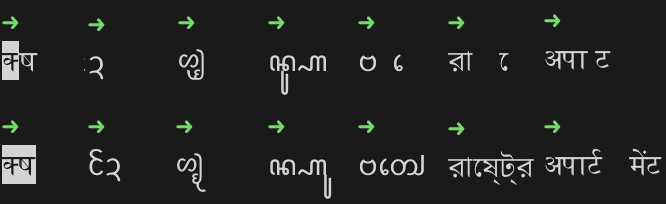
The first row shows the previous version and the second row shows 1.3.0 rendering the same text. Notice the improved ligature formation, combining mark placement, and grapheme clustering — in the first column, the selection highlight now correctly covers the entire character as a single unit.
Thanks to asciinema, we received ~4GB of public terminal recording data to analyze and optimize Ghostty's performance. This is exciting because it's based on real-world terminal usage, not just synthetic workloads.
Using this data, we improved I/O processing considerably, lowering the time it took Ghostty to replay everything in the dataset from minutes to tens of seconds (with asciinema configured to ignore all pauses, of course). These improvements were also visible in synthetic benchmarks such as Alacritty's vtebench.
In addition to I/O updates, the renderer was rearchitected, lowering the time the renderer holds the terminal lock by 2x to 5x. And in most frames, the renderer doesn't hold the lock at all thanks to improved dirty/damage tracking. This applies to both Metal and OpenGL.
PRs: #10337 #10401 #11089 #11109 #9594
Ghostty 1.3 includes a significant investment in stability and robustness.
This release fixes a major memory leak that Claude Code regularly triggered in prior Ghostty releases. This leak has existed since Ghostty 1.0 but was difficult or rare to trigger until Claude Code began exhibiting the perfect conditions to trigger this at scale, especially with their large user base. Details of the leak and the fix can be found in this specific blog post about it.
We also ran this release through extensive AFL++ fuzz testing for Ghostty's terminal escape sequence parser (#11089 ) and the full VT stream processor (#11109 ). We identified and fixed around 10 crashes and potential memory safety issues through this process. None of these were known to cause any real-world issues, but they may have! As a longer-term goal, we'd like to spin up infrastructure to continuously fuzz Ghostty.
We built a new testing tool called Tripwire
(#10401 ) to systematically test errdefer cleanup paths by injecting
failures at every try site. This uncovered and fixed several bugs including
memory leaks, state corruption, and glyph cache corruption in the font
subsystem. This only addresses bugs in error recovery paths, so this
helps Ghostty be more robust in the face of unexpected errors such as OOMs,
GPU driver issues, etc.
On the memory side, we've optimized memory in a handful of places. Alt screen memory is now allocated on demand, saving several megabytes per terminal for sessions that never use it (#9594 ). There are a variety of minor improvements in all subsystems, however.
Ghostty now has built-in AppleScript support on macOS, enabling powerful automation and integration capabilities. Using AppleScript, you can inspect and control windows, tabs, splits, and individual terminals. In addition to simple creation and navigation actions, you can also send text, key, and mouse input.
Some example workflows that are possible through scripting include automated terminal layouts, command broadcasting, jumping to terminals by working directory, and more.
Here is a short example that targets the currently focused terminal in the frontmost Ghostty window:
tell application "Ghostty"
    set term to focused terminal of selected tab of front window
    input text "pwd\n" to term
end tell
AppleScript is enabled by default and secured by macOS Automation
permissions (TCC), so macOS will prompt before another app can control
Ghostty. If you don't want AppleScript support at all, set
macos-applescript = false.
We're treating this as a preview feature in 1.3. The AppleScript functionality didn't get as much time as other features to test in our pre-release builds, so we expect we'll make breaking API changes and add significant new features in 1.4 based on user feedback.
PR: #10090
You can now reorder splits on macOS by dragging them. When you hover near the top of a split, a grab handle appears that can be used to drag the split into any other split position. Simply grab the handle and drop the split where you want it; the terminal contents, working directory, and running processes all move with it.
You can also drag splits out of windows or into new tabs, and all of this integrates with the undo/redo system so you can easily revert if you accidentally drop a split somewhere you didn't want it.
This is a mouse-driven approach to rearranging your terminal layout without having to close and recreate splits. The implementation also lays the groundwork for future enhancements like dragging splits into new tabs or windows.
A GTK implementation of this feature is planned for a future release.
PR: #9116
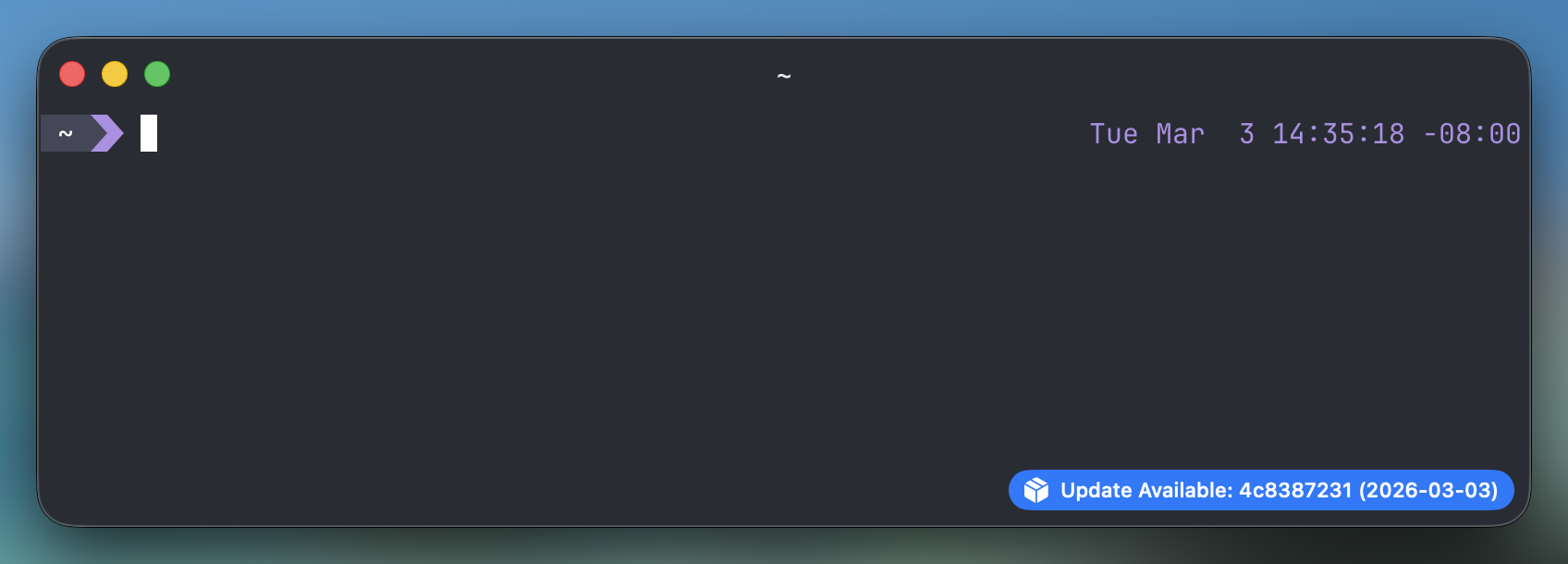
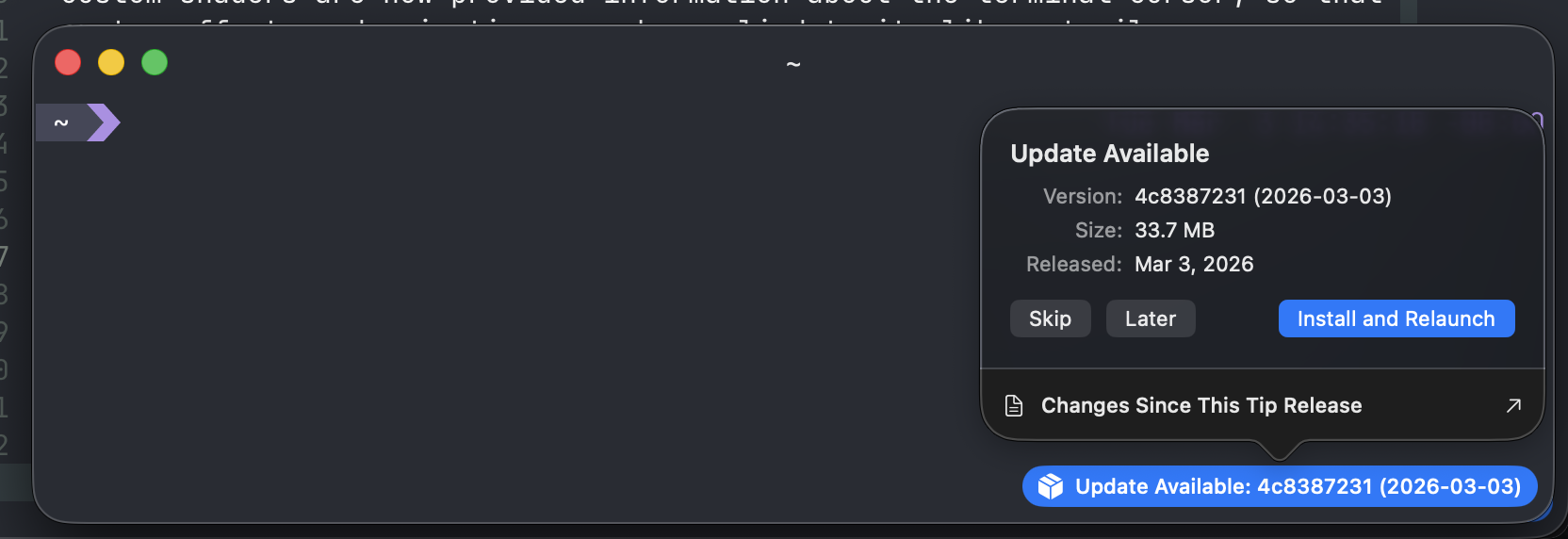
Update notifications on macOS are now unobtrusive. If a terminal window is open, update notifications appear as a small pill in the titlebar or bottom corner of the window instead of a disruptive popup window. The pill itself can be dismissed with a right click if you want to further hide it.
You can also trigger a full update and restart directly from the command palette with "Update and Restart" (#9131 ), making the entire update process keyboard-driven.
There are no changes to the system requirements from Ghostty 1.2.
macOS: The minimum required macOS version for Ghostty 1.3 remains unchanged (macOS 13 Ventura).
GTK: Ghostty 1.3 requires GTK 4.14 and libadwaita 1.5. This aligns with our GTK/Adwaita version policy. Systems with older GTK or Adwaita versions can work around this requirement by using an older version of Ghostty or a community-maintained snap or flatpak package.
This is the last version to support macOS 13. Starting with Ghostty 1.4 (and tip releases prior to 1.4), the minimum required macOS version will be macOS 14. Apple dropped security support for macOS 13 in the fall of 2025, so this change is in line with Apple's general support.
The following default behaviors have been changed in 1.3.0:
- The default clipboard copy format has changed from
texttomixed. Themixedformat sets both plain text and HTML on the clipboard. If this causes issues, you must rebindcopy_to_clipboardwith a specific format. #9418 - GTK: FreeType now defaults to light hinting instead of full hinting,
matching the behavior of most other GTK applications. The old behavior
can be restored via the
freetype-load-flagsconfiguration. #9253
- Scrollback search is now available to search through terminal scrollback.
This is triggered with
cmd+fon macOS andctrl+shift+fon GTK and comes with a number of new bindable actions. #189 - Native scrollbars are now available to navigate scrollback. These can
be controlled with the new
scrollbarconfiguration. #111 - Inherit working directory configuration can now be specified differently for windows vs. tabs vs. splits. #1392
- Keybinds now support chaining multiple actions in sequence using
the
chainkey, allowing a single keybind to trigger multiple actions (e.g., toggling fullscreen and window decorations together). #9961 - Keybinds now support key tables: named sets of keybindings that can be activated and deactivated, enabling modal keybinding workflows. Tables support one-shot mode, catch-all fallthrough, stacking, and compose with key sequences and chained actions. #9963
- New
catch_allspecial key for keybindings that matches any key not explicitly bound. Supports modifiers (ctrl+catch_all=...) and trigger sequences (ctrl+a>catch_all=...). #9977 - Data copied to clipboard now supports rich text and can be configured
with
copy_to_clipboardbinding action parameters. #9396 - Window and tab titles can now be set separately from split titles using the menu, command palette, or new keybind actions. #9879
- Session search in the command palette lets you jump to any running terminal by searching its title or working directory, with tab color indicators (macOS). #9945
- Support Kitty's
click_eventsextension which lets clicking the prompt in supported shells move the cursor, such as Fish v4+ and Nushell 0.111+. #10536 - Support OSC133
cl=lineso bash and zsh get clickable prompts with the above. #10542 - The Ghostty configuration can now have the
.ghosttyextension. #8689 - Ghostty can now show notifications when a command finishes using the
notify-on-command-finishconfiguration. This can be set to trigger under various conditions such as slow commands, unfocused windows, etc. #8991 - A surface can now be marked "readonly" and it will no longer send any input events to the pty and will always warn before closing. This can be triggered by a new keyboard binding, command palette, etc. #8432
- A new configuration
key-remapcan be used to remap keys from one to another within the scope of Ghostty. Example:key-remap = ctrl=super. #5160 - A new configuration
clipboard-codepoint-maptakes a mapping to replace some codepoints when copying to the clipboard (writing the clipboard, specifically). This would allow copying things like symbols for computing, branch drawing, etc. #8383 - A new configuration
selection-word-charscan be used to configure the characters that determine word boundaries for double-click selection. #9335 - A new configuration
mouse-reporting = falsecan be used to disable all TUI mouse reporting features. #8430 - A new configuration value
scroll-to-bottom = outputthat automatically scrolls the window to the bottom on any output (default off). #9938 - A new configuration option
split-preserve-zoomthat starts with a single optionnavigation(default false). When navigation is set, zoomed splits will remain zoomed when split navigation (goto_split) is done. #8458 #9089 - A new binding action
goto_window:nextandgoto_window:previousto deterministically navigate through windows. #8387 - A new binding action
toggle_mouse_reportingtoggles mouse reporting to the TUI. #9282 - A new
end_key_sequencebinding action to explicitly end an active key sequence, flushing prior keys to the terminal without encoding the triggering key (e.g.ctrl+w>escape=end_key_sequence). #10098 - The
close_tabbinding action takes a new parameterrightwhich closes all tabs to the right. #9783 resize_splitandtoggle_split_zoomactions now return false when there is only a single pane, allowingperformable:keybinds to pass the key through to the terminal application. #10376- The quick terminal now sets the
GHOSTTY_QUICK_TERMINALenvironment variable which can be used in any way, such as for custom shell prompts. #9673 - The
cursorshell integration feature now respectscursor-style-blink, using a steady bar when blinking is disabled instead of always using a blinking bar. #10643 - Right clicking a URL will now highlight the full URL. #9298
- Upgrade to Unicode 17. #8757
- The
+list-themescommand now has a keybind to write a configuration file. #8930 - Commands started with
-enow set the terminal title toargv[0]. #9121 - Custom shaders have many new uniforms such as cursor shape, position, previous position, time since change, color scheme, etc. to support more advanced shaders. #9416 #9417
- OSC7 URI parsing now handles more edge cases such as MAC addresses better. #9193
- Unsafe control characters in pasted text are now replaced with spaces to prevent malicious pastes from tricking users into executing unexpected commands, matching xterm's behavior. #10746
- IME preedit text is now rendered with underlines instead of inverted colors for better readability and consistency across programs. #10368
- Improved font rendering on some low-DPI monitors. #9432
- For font metrics, round cell height from line height instead of ceiling. This change should give more consistent results between high and low DPI displays. #9648
- Decouple balanced top and left window paddings to avoid diagonal resize window jitter. #9518
- Update many default keybindings to work with other keyboard layouts. This should not affect standard US layouts. #9469
- Ignore Unicode byte-order-mark (BOM) characters in the configuration file. #9490
- Keypad variation sequences respect Unicode VS16. #9502
- VS15/16 check now considers emoji bases properly. #9679
- Grapheme break algorithm updated to match Unicode spec exactly. #9680
- Fix rendering of wide grapheme clusters in scripts like Devanagari where multiple non-zero-width code points combine into a single cluster that should occupy two cells. #10465
- Fix possible crash due to data race condition looking up hyperlinks. #9813
- Fix possible crash due to data race with selection and copy. #9818
- Fix a crash caused by a race condition between drawing Kitty image placements and the placement list being updated, triggered when rapidly cycling through images in applications like Yazi. #10680
- Fix a major memory leak when pruning scrollback with non-standard sized pages. Non-standard pages (caused by emoji-heavy, hyperlink-heavy, or Claude Code output) were incorrectly returned to the memory pool instead of being unmapped. #10251
- Fix rendering artifacts that could be caused in certain edge cases with insert lines or delete lines (IL/DL) VT operations. #10290
- vt: More complete and accurate parsing and implementation of OSC 133. #10427
- vt: ConEmu OSC9 is now fully parsed (subcommand 1 to 12). Ghostty GUI only implements a subset of this but libghostty can parse it all. #3125
- vt: Report color scheme events are now reported synchronously. #5922
- vt: Modify other keys state 2 no longer encodes option as alt on macOS. #9406
- vt:
shift+backspaceencodes properly for Kitty Keyboard Protocol. #9896 - vt: CSI Scroll Up (
\e[nS) now preserves scrolled-off lines in the scrollback buffer instead of erasing them, matching the behavior of other terminal emulators. This fixes Fish shell'sCtrl-L(scrollback-push) losing history. #9905 - vt: Reset (
RIS) now also resets the progress bar. #10168 - vt: Suppress mouse reports for focus-transfer clicks so split focus changes don't emit unintended mouse input to terminal applications. #11167
- vt: Parse Kitty text sizing protocol (OSC 66), not implemented in the GUI yet. #10315
- vt: Parse (but do not implement) iTerm2 OSC 1337 extensions. #10417
- vt: Parse (but do not implement) Kitty clipboard protocol (OSC 5522). #10560
- vt: Significantly more tmux control mode parsing, but not hooked up to the GUI yet. #9803 #9860
- vt: Fix crash with specially crafted large images in Kitty Graphics. #9579
- vt: Fix crash when spamming BEL (0x07). #9800
- vt: Ghostty terminfo now advertises support for SGR dim. #11144
- nu: SSH shell integration now supported. #7877
- fish: Add descriptions to fish shell completions for Ghostty. #9531
- zsh: Fix literal
\nappearing in window titles when running commands in zsh by stripping control characters instead of converting them to visible representations. #10341 - bash: shell integration no longer depends on bash-preexec for Bash 4.4+, using native PS0 and PROMPT_COMMAND instead for faster and simpler hooks. Older Bash versions (e.g. macOS's 3.2) continue using bash-preexec. #10609
- elvish: always report working directory changes, decoupling it from the title reporting feature. #10533
sudoshell integration feature is now more stable across all shells. #9891- Fix SSH cache failing when
$TMPDIRand$XDG_STATE_HOMEare on different filesystems. #10364 - If
cursor-styleis manually set, defaultshell-integration-featuresto containno-cursor. #8681
- macOS: A drag handle now appears at the top of every terminal for reordering splits, moving a terminal into a new tab or window, etc. #1525 #10090
- macOS: New "Set Ghostty as Default Terminal App" option, making it easy to set Ghostty as the handler for opening directories, shell scripts, etc. #10810
- macOS: Double-clicking a tab now allows inline editing of the tab title. Press Enter to confirm or Escape to cancel. #10963
- macOS: Custom command palette entries with
command-palette-entry. This has been supported on GTK since 1.2.0. #7158 - macOS: Update notifications now appear as an unobtrusive pill within terminal windows rather than a popup dialog. #9116
- macOS: Mouse buttons 8/9 (back/forward) now encode properly in the terminal. #10381 #2425
- macOS: A new app intent to focus a specific terminal usable by Apple Shortcuts. #8961
- macOS: Right-click tabs to set a tab color. #9784
- macOS:
background-blurnow supports new options to use macOS 26 native liquid glass blurring. #8801 - macOS:
bell-features = audionow works on macOS. You can specify a custom audio file to play on terminal bell events. #11154 - macOS: The
fullscreenconfiguration can now be used to start Ghostty in non-native fullscreen in addition to native fullscreen. #9876 - macOS: Implement the
close_all_windowsbinding action. #9552 - macOS: Add a new keyboard binding
toggle_background_opacity. #9117 - macOS: Support native
Cmd+Home/Cmd+Endshortcuts to scroll to the top or bottom of the terminal scrollback. #10003 - macOS: Equalize splits when double-clicking the split divider. #9524
- macOS: The notification badge now clears when all active terminal bells are cleared. #8487
- macOS: The
systembell setting (default off) now uses the system beep. #9339 - macOS: The dictation icon now appears in a more correct location. #8493
- macOS:
window-widthandwindow-heightnow properly take into account window chrome such as tab bars. #2660 - macOS: Restored non-native fullscreen windows now restore properly. #8435
- macOS: Quick terminal state is restored properly. #9588
- macOS:
toggle_quick_terminalno longer makes hidden windows visible. #8414 - macOS: Text field in unsafe paste confirmation is no longer editable. #9400
- macOS: Close confirmation sheet attaches to a relevant window. #9509
- macOS: Metal loads linearized foreground color for the cursor cell so cursor text appears correct. #9695
- macOS: Fix "Undo New Tab" crashing on certain systems. #9512
- macOS: Fix command palette not closing on mouse click when
focus-follows-mouseis set. #9533 - macOS: Fix
quick-terminal-sizenot working consistently for people. #9837 - macOS: Custom app icons now update more reliably using
NSDockTilePlugIn, fixing corner radius issues on older macOS versions. #9983 - macOS: Menu bar now flashes briefly when using keyboard shortcuts that have menu equivalents (e.g. Cmd+V, Cmd+N, Cmd+T), matching standard macOS behavior. #10122
- macOS: Apply subpixel horizontal alignment also when cell width is less than advance, resulting in smoother rendering. #9646
- macOS: Font shaping now uses glyph positions for correct placement, fixing rendering of scripts where glyphs are visually reordered from their logical order in text (e.g. Tai Tham vowels rendering ahead of their associated consonants). #9883
- macOS: Fix
window-width/window-heightto properly clamp to the visible screen size and work correctly withwindow-position. #9975 - macOS: Hide the tab overview properly on escape. #9971
- macOS: Fix Cmd-click on file paths containing
~(e.g.~/Documents/file.txt) by expanding the tilde to the user's home directory before opening. #10863 - macOS: Fix a crash when the terminal window texture exceeds the GPU's maximum allowed size by clamping texture dimensions to the device limit. #9972
- macOS: Optimize the Secure Keyboard Input overlay animation,
reducing CPU usage by ~35% and fixing lag and frozen frames caused
by the previous
innerShadow()implementation. #10903 - macOS: Fix Vim filetype detection to recognize the macOS-specific Ghostty config path as a Ghostty configuration file. #10101
- macOS: Various windowing fixes with
macos-titlebar-style = tabs. #9596 #9597 - macOS: Various fixes around dark/light theme reloading. #9360
- macOS: Various fixes to ensure the mouse cursor is more accurate depending on the state. #9580 #8409
- GTK: Two-finger left/right swipes switch tab pages. #10575
- GTK: Key tables and sequences now have dedicated UI showing the pending keyboard input state to match macOS. #2127
- GTK: Spatial split navigation now wraps around at the edges, so navigating past the last split in a direction wraps to the first split on the opposite side. #10811
- GTK: The
+new-windowCLI command now accepts-eand--working-directory. #10809 - GTK: Cgroups have been revamped so that cgroups are now properly scoped per-surface. #10611 #2084
- GTK: Split-modifying actions such as creating, resizing, or closing splits no longer flicker the entire window. #8208
- GTK: Windows with custom
window-heightorwindow-widthnow center properly. #7937 - GTK:
paste_from_clipboardnow returns false when the clipboard contains no text (e.g. an image), allowingperformable:keybinds to pass the keypress through to the terminal application. #10089 - GTK: Fix an issue where the i3 window border would disappear after toggling fullscreen back and forth. #8075
- GTK: Fix Kitty keyboard protocol not reporting text events for composed keys (e.g. accent characters via Compose key on international keyboard layouts). #10049
- GTK: Respect the
gtk-enable-primary-pasteGSettings option, allowing users to disable middle-click paste via the GNOME desktop setting. #10328 - GTK: Log a warning when OpenGL version is too old instead of crashing without notice. #9586
- GTK: Default FreeType flags to light hinting instead of full hinting to match the behavior of most other GTK applications. #9253
- GTK: XKB mapping works properly on Linux. #9454
- GTK: If 4.2 is available, use media queries and
prefers-color-schemein CSS. #9520
Ghostty 1.3 adds support for 6 new languages:
- Croatian
- Kazakh
- Latvian
- Lithuanian
- Spanish (as spoken in Spain)
- Vietnamese
Localization is maintained by volunteer contributors. If you want to help localize Ghostty in your language, please open a discussion on the GitHub repo. Thank you to all the volunteers who contributed to Ghostty's localization!
- Ghostty now requires Zig 0.15 to build. #8372
While not directly related to the Ghostty 1.3 release, one of the goals of the 1.3 development cycle was to begin focusing on libghostty in earnest, so I wanted to include an update on that here.
During the 1.3 development cycle, libghostty was successfully extracted and is now available as a standalone Zig module. The Zig module is full featured and shares almost all of its code with Ghostty. Simultaneously, there is a work-in-progress C API. There are a set of Zig and C examples in the Ghostty repository.
We aren't ready to tag a versioned release for either of these modules yet, but dozens of projects both free and commercial are already using libghostty, and I'm excited about it! If you're interested, there is a libghostty channel in our Discord.
The Ghostty development team has decided to separate the Ghostty GUI and libghostty release cycles, so libghostty will have its own versioning and release schedule independent of the Ghostty desktop application. This allows us to maintain different paces of development for the library and the desktop application, which have different user bases and stability requirements.
We aren't sure yet when we'll tag the first libghostty releases, but work continues on both the Zig module and C API, and we hope to have a release soon!
Ghostty officially became a non-profit project during the 1.3 development cycle.
This matters because it provides enforceable assurances that Ghostty cannot be sold, pivoted, or repurposed for commercial gain. The non-profit structure protects the people and communities that adopt and contribute to Ghostty, ensuring the project is stewarded by a mission-driven entity that prioritizes public benefit over private profit. For more on the motivation behind this decision, see the original announcement.
We have now officially signed 5 contributor contracts, compensating individuals who are involved in the project and have consistently demonstrated high-quality work. These contracts cover community management, graphics work, Unicode compatibility, GTK, and Discord/GitHub integrations. These contracts commit almost 300 hours of billable work, and we're excited to provide paid opportunities for contributors to continue their work on Ghostty.
If you'd like to support Ghostty, please visit our sponsorship page.
With highly requested features like scrollback search and native scrollbars now implemented, I believe Ghostty 1.3 is a great release that delivers on the longstanding goal to make Ghostty the "best existing terminal emulator".
"Best" will always be subjective, of course, but the point is that Ghostty 1.3 has all the mainstream features that users expect from any established terminal emulator, and it delivers them with a high level of polish and performance. We'll continue to improve Ghostty, of course, but this marks a major milestone in the project's development.
The short-term focus will be on stabilizing and tagging a libghostty release. Dozens of projects are already using libghostty, and I believe that ultimately libghostty will be more widely used and influential than the Ghostty desktop application itself, so this is an important next step for the project.
There is also a lot of non-profit development work to be done such as building out a corporate sponsorship program, providing more tangible benefits for sponsoring the project, better advertising what Ghostty is doing with funds, and more.
Ghostty 1.4 will continue to iterate and improve the desktop application. I don't want to promise any specific features, but we're working hard on making Ghostty scriptable, enabling a true Tmux control mode, graphical preferences, and more.
To answer a common request, support for Microsoft Windows is still not planned. This still remains part of the long term roadmap, but I think that focusing on a capable and powerful libghostty will enable better Windows support in the long run. libghostty itself already supports Windows.
Ghostty 1.4 will continue the 6-month release cycle and is planned
for September. For users interested in more frequent updates, we recommend
using the tip release channel on
macOS or
building from source frequently on Linux.